
This section is located on the Security Options page under the General tab.
In the PIN policy section, you can create a PIN policy for users.
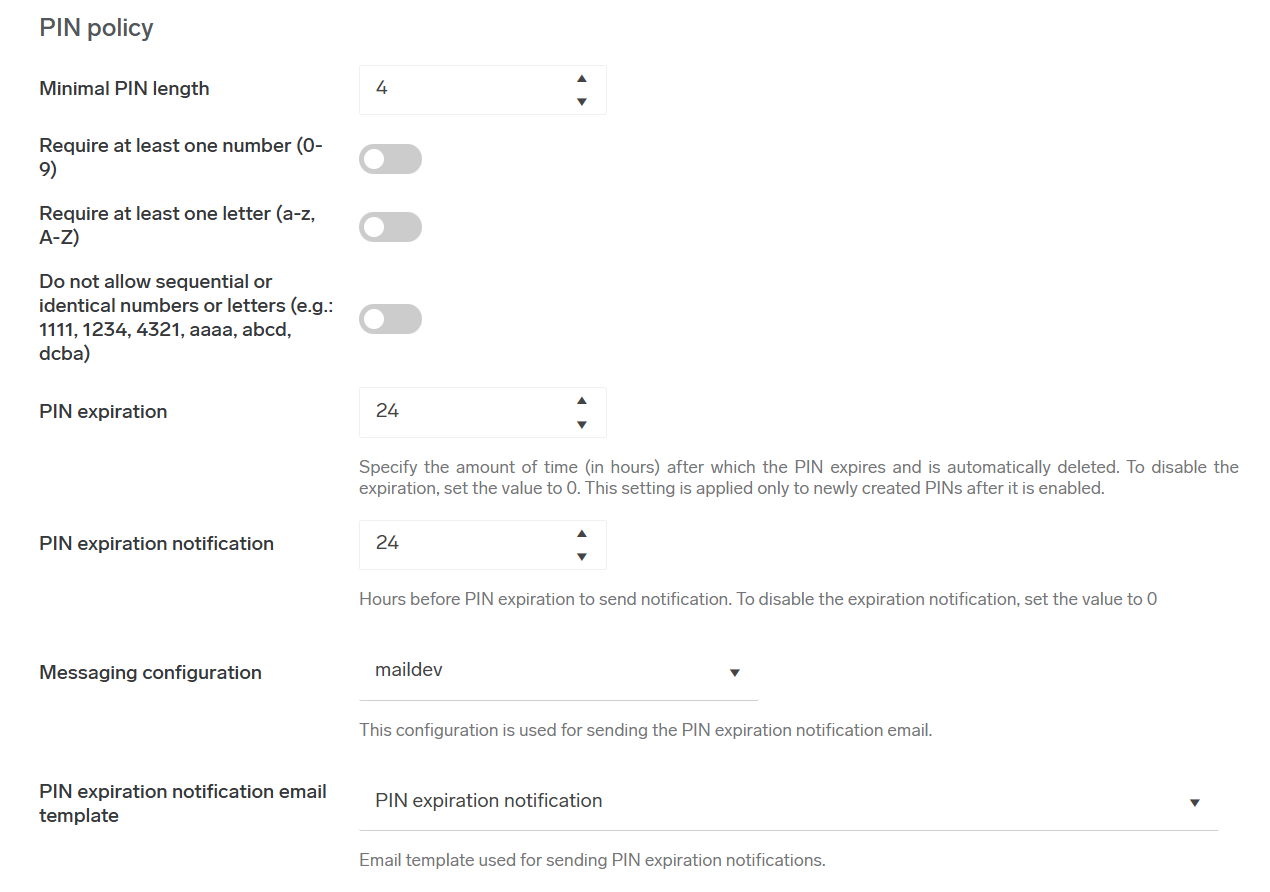
The minimal PIN length property can't be disabled, and the minimum PIN length can't be less than 4 characters.
Property Do not allow sequential PIN
If enabled, PINs consisting of sequential characters or repeated patterns, such as 1234, 4321, 1111, abcd, AAAA, or ABCD, are automatically disallowed. However, the policy does allow mixed case patterns, such as AbCd, aaAA as these are considered to be more complex and less predictable.
Scope of the policy
The policy applies to all operations where a user's PIN is created or changed:
-
administrator edits the user record
-
user edits their own profile
-
user account is created or updated via the API
-
Via a trigger rule. For example, when the user submits their first print job to Dispatcher Paragon Cloud.
If the PIN doesn't meet the policy requirements, the operation will be rejected. Errors are displayed at the top of the UI form. When using the API, errors are recorded in the log file.
Existing users
When an administrator changes the PIN policy, it doesn't apply to the current PINs of existing users. Therefore, even after the policy has been changed, the database may still contain users with PINs that do not comply with the policy.
PIN expiration
PIN expiration specifies how many hours the PIN is valid. After the specified time the PIN expires and is deleted. Enabling PIN expiration applies only to newly created PINs. The maximum configurable value is 10 years.
PIN expiration notification
The administrator can configure how many hours in advance of the PIN’s expiration the system sends an email notification to the user. When this is set to 0 or PIN expiration is set to 0 the notifications will not be sent. The maximum value for PIN expiration notification is one year. PIN expiration notifications apply to all users for whom PIN expiration is configured.
The PIN expiration date and time in the notification email is shown in the account's configured time zone, with the time zone displayed in parentheses after the date (for example, Jun 20, 2026, 6:30 PM (CEST)). If the account does not have a time zone configured, the time zone is inherited from its parent account, searching up the account hierarchy until one is found. If no time zone is configured anywhere in the account hierarchy, the system default time zone is used.
-
In Messaging configuration, select which of your messaging configurations will be used to send emails.
-
In PIN expiration notification email template, select which of existing emails templates will be used for PIN expiration notification. It uses predefined template by default, which can be customized by, for example, adding terms of service. It is also possible to create custom template and use it.
There are several variables usable for this template:-
{{pinExpiration}} - Time when PIN expires for the user
-
{{username}} - Username of the user
-
{{customer-name}} - Name of the company (e.g. Acme corporation)
-