
Important: Legacy port consolidation — migration dates moved.
Migration to port 443 was moved to progressively start from 22 October 2026, and port 2560 closure progressively from 12 November 2026.
What you need to do, before 22 October 2026
-
Upgrade all PC Clients and Gateways to 2026.06.25 or later, across the whole estate. Watch for machines excluded from auto-update or from your deployment tool.
-
Confirm outbound port 443 (TLS 1.2+) to your tenant domain is permitted by your firewall and web proxy, and test from every relevant network segment, not just one.
-
If you want to migrate a customer sooner, your partner can request per-tenant migration from Y Soft ahead of the global enablement.
Components on older versions that cannot reach port 443 will lose connectivity once the migration is enabled, and recovery is manual on every affected machine. Components on 2026.06.25 or later are safe in the same situation: they stay on the legacy port until port 2560 itself closes, which gives you time to fix the firewall.
What is changing
We are consolidating all communication onto port 443 (HTTPS / WebSockets, TLS 1.2 or newer), in two steps:
-
Port 2560 (Gateways and PC Clients) - October 2026.
-
We are retiring the legacy communication channel on port 2560. Unlike the rest of our communication, this channel cannot be managed, monitored, or updated on a per-customer basis, which is why it is being removed first.
-
From 22 October 2026: we enable the migration to port 443 globally, across all data centers. Every Gateway and PC Client that meets both conditions below switches to port 443 automatically.
-
From 12 November 2026: port 2560 is closed, progressively, data center by data center.
-
-
All remaining legacy ports — by end of January 2027. Port 443 has been the default requirement and setting for over two years, so the large majority of connections already use only 443. Some older components — certain terminals, clients, mobile apps, and other legacy elements — may still connect over legacy ports. Those ports will be closed by end of January 2027. We are adding tenant-specific reporting so we can identify affected customers ahead of time and notify them through their partner. Reducing the number of open ports also simplifies configuration and lowers the platform's exposure surface.
Two conditions for a smooth migration
A. PC Client and Gateway on version 2026.06.25 or later. From this version, the component verifies that port 443 is actually reachable before switching to it. If it cannot reach 443, it stays on the legacy port and retries later, without losing connectivity.
B. Outbound port 443 to your tenant domain is not blocked. The component must be able to reach your tenant domain (for example customer.eu.ysoft.cloud) on port 443 with TLS 1.2 or newer: not blocked on the firewall, and not broken by a web proxy or TLS inspection.
Note that upgrading alone does not migrate a component. If it was originally deployed with legacy communication settings, it stays on the legacy port even on a current version. The migration enabled on 16 September is what moves it to 443, and it succeeds safely only when both conditions are met.
No change to
Local communication between clients and on-premises Gateways is unaffected.
Questions
Please contact your Y Soft account manager or partner.
2026.10.01
Legend:
✅ Added feature
ℹ️ Improved/changed feature
⚠️ Bug fixed
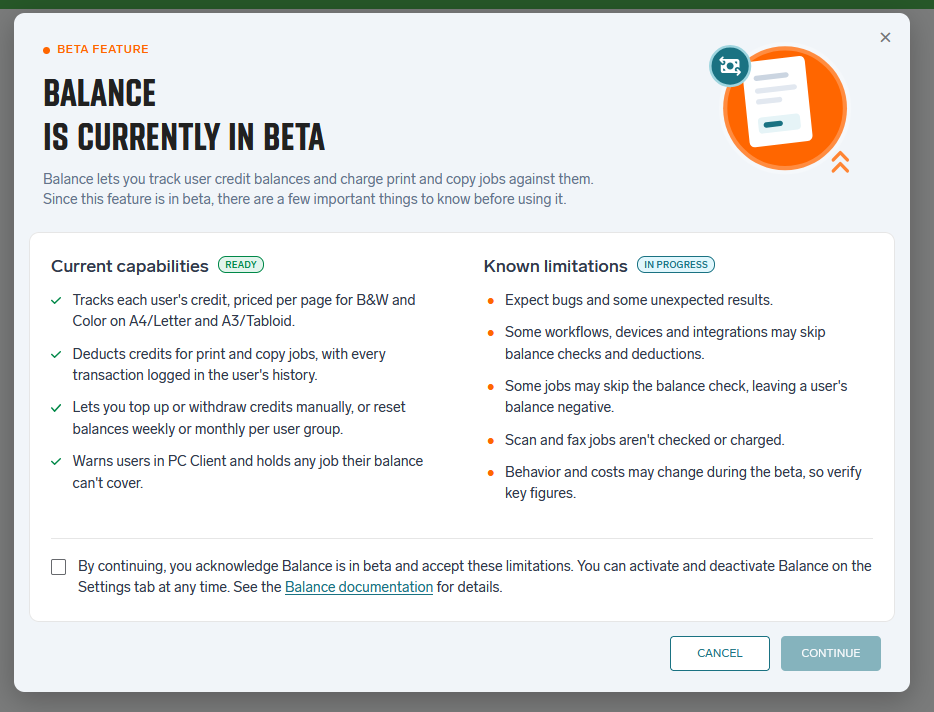
Print and copy control (Public Beta)
✅ Balance - credit-based print and copy control (HCP-14855, HCP-17694)
-
Administrators can now give users a credit balance and charge print and copy jobs against it, at a configurable price per page for black-and-white and color, A4/Letter and A3/Tabloid.
-
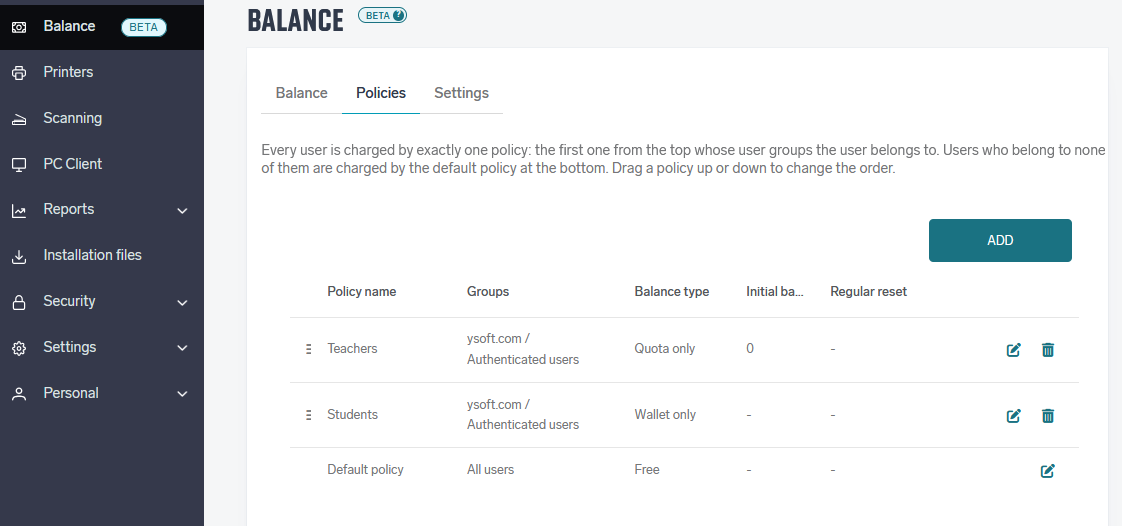
Users can have a free Quota that resets weekly or monthly, a paid Wallet, or both. When a user has both, the Quota is used first.
-
Credit policies assign the balance type, initial credit and reset schedule per user group, and administrators can top up or withdraw credit and review each user's transactions.
-
Users see their balance, prices and transactions on the My Balance page and on the Cloud terminals.
-
If a user's balance does not cover a job, the job is held until the balance is topped up.
-
Balance is available as a beta. The administrator enables it and confirms the beta notice before first use.. Supported terminals and current limitations are listed in the Balance documentation.
-
Available with Pro licensed devices.
Identity Management
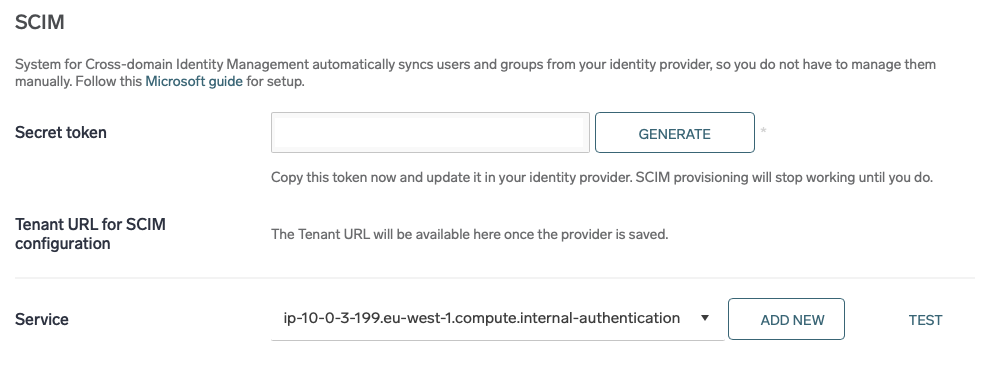
✅ Automatic user and group provisioning from Microsoft Entra ID (SCIM) (HCP-15660)
Microsoft Entra ID can now create, update and disable users and groups in Dispatcher Paragon Cloud automatically, using the SCIM 2.0 standard. No service account is needed: Entra ID sends only the users and groups the administrator assigns to the Dispatcher Paragon Cloud app. Sign-in stays with the existing OpenID Connect (OIDC) authentication provider. Works with both free and paid Microsoft Entra ID licenses. Learn more About SCIM and how to set it up Microsoft Entra authentication | OIDC + System for Cross domain Identity Management (SCIM)
What it does
-
Users are created in advance, with card number, PIN, department, home folder and name alias mapped from Entra ID. New users can print on day one without registering a card at the printer.
-
Changes made to a user in Entra ID are applied to Dispatcher Paragon Cloud automatically.
-
Disabling or deleting a user in Entra ID disables the user in Dispatcher Paragon Cloud, including their cards.
-
Groups created, changed or deleted in Entra ID, including their members, are reflected in Dispatcher Paragon Cloud. Nested Entra ID groups are converted into a flat group list.

Admin Web UI
ℹ️ Terminal deployment commands can be generated for a specific command shell (HCP-17587)
The commands prepared for manual terminal deployment quoted passwords in a way that works in one command shell but not in another — for example, a password containing a $ character was silently altered when the command was run in PowerShell. Administrators can now choose which shell they will use, and the commands are generated with the matching syntax.
⚠️ Adding a printer in a container no longer creates a duplicate Secure queue (HBT-6726)
Adding a printer inside a container with the default Secure option created a new Secure print queue in that container, which then also appeared as a duplicate queue at the customer level. Containers no longer get their own Secure print queue, and the customer keeps a single one.
⚠️ Reports no longer show text in the wrong language (HBT-6754)
With a language other than English selected, the Reports section, scheduled reports and the regional settings could show text in a different language or with the wrong meaning. The translations have been reviewed and corrected for all supported languages.
API
⚠️ Scan-to-download results can be retrieved through the public Documents API (HCP-17695)
Documents produced by a scan-to-download job could not be retrieved or downloaded through the public Documents API. They can now be retrieved and downloaded like other completed documents.
Cloud Terminal updates
Some improvements and fixes require updated versions of Cloud Terminals. Please refer to the vendor-specific terminal release notes for details and required terminal versions.
Ricoh Cloud Terminal
ℹ️ Timeout and print job authentication can be configured when deploying Ricoh terminals (HCP-15354)
When deploying a Ricoh Cloud terminal with the Terminal Deployment Tool, administrators can now configure the timeout and print job authentication settings.
FUJIFILM BI
⚠️ The terminal recovers automatically when it fails to start (HBT-6688)
If the terminal failed to initialize — for example because the device was still starting up — it stayed on the error screen until someone reloaded it manually on the panel, even though the screen said it would reload on its own, and the error shown could wrongly suggest a network problem. The terminal now retries automatically and reports the actual cause.
Security
Security improvements and fixes (HBT-4408, HBT-4908, HBT-5074, HBT-5769, HBT-5957, HBT-6104, HBT-6235, HBT-6477, HBT-6607, HBT-6683, HBT-6714, HCP-17531, HBT-6723, HBT-6742, HBT-6747, HCP-17667, HCP-17667)
2026.09.17
✅ Added feature
ℹ️ Improved/changed feature
⚠️ Bug fixed
Admin Web UI
⚠️ Reporting is now reachable from restricted customer networks (HBT-6037)
Reporting is served from a separate domain from the main tenant, which was not documented as a requirement — customers with restricted outbound network policies could end up blocking it without realising it was needed. The additional domain is now documented so administrators can allow it.
⚠️ A requested output page size on the public API is no longer silently ignored (HBT-6548)
Uploading a document through the public API with a named output page size (for example A5) had no effect — the conversion and print-scaling steps did not recognise the internal format the size was converted to, and the document printed at its original size instead. The requested page size is now applied.
ℹ️ The email template editor now shows only the variables valid for the template being edited (HCP-16929)
Each built-in email template supports its own set of variables, but the editor previously showed the same fixed list regardless of which template was open. The editor now shows only the variables that apply to the template being edited.
Authentication
ℹ️ Administrators can now control the order of authentication provider buttons on the login screen (HCP-17544)
The order in which authentication provider buttons appeared on the login screen was previously incidental rather than configurable. Administrators can now control the display order of these buttons.
ℹ️ Authentication provider priority now also affects the default user search directory (HCP-12934)
The default directory used when searching for users was always Local users, regardless of which authentication provider was configured with higher priority. The default search directory now follows the same priority order as the authentication providers.
Scan Workflows
✅ The Generic HTTPS Connector can now authenticate to its target endpoint (HCP-15795)
The Generic HTTPS Connector can now be configured with authentication, so it can connect to target endpoints that require authenticated requests.
⚠️ A single large OCR request no longer blocks other OCR requests from finishing (HBT-6587)
A long-running OCR request on a large document could stall completion of other OCR requests already in progress for extended periods. OCR requests now finish independently of each other.
PC Client
⚠️ The client's connection to the server is no longer dropped by forwarding proxies (HBT-6674)
Some forwarding proxies terminate idle network connections after a period of inactivity, which could silently break the client's connection to the server every hour or so. The client now keeps the connection active so it is not mistaken for idle.
⚠️ The color mode from a configuration profile now applies to print jobs from macOS (HBT-6578)
When a configuration profile set the color mode to grayscale, jobs printed from macOS applications were still submitted and released in color unless the user explicitly picked grayscale in the print dialog. The color mode from the profile is now applied to every job. Note: hotfixed
Cloud Terminal updates
Some improvements and fixes require updated versions of Cloud Terminals. Please refer to the vendor-specific terminal release notes for details and required terminal versions.
HP
⚠️ The option to lock native Settings and Reports apps is available again (HBT-6622)
Customers who were used to having the native Settings and Reports applications unlocked lost that option in an earlier release with no way to restore the previous configuration. Administrators can again choose whether these applications are locked.
Other
Stability and security improvements (HBT-5771, HBT-5968, HBT-6054, HBT-6533, HBT-6716)
2026.09.03
✅ Added feature
ℹ️ Improved/changed feature
⚠️ Bug fixed
PC Client
✅ Brand New Offline Mode (HCP-16971)
The Dispatcher Paragon Cloud Client can print even when it cannot reach the Dispatcher Paragon Cloudserver. For example during a network or server outage. Offline printing is always available and needs no configuration.
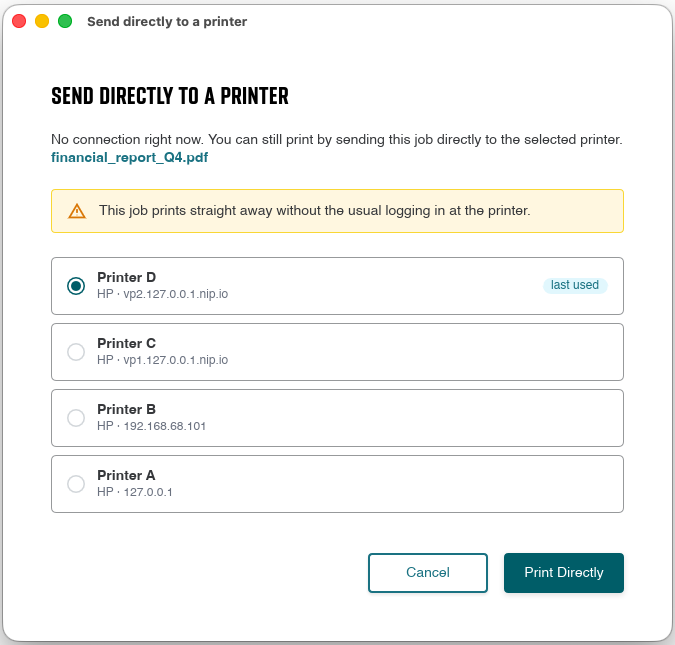
When you print to a secure (pull) print queue while offline, the client offers to send the job directly to one of the printers you have used recently. When you print to a direct queue, the job goes to its usual printer as normal. Everything printed offline is reported to the server automatically once the connection is restored, so your print history and accounting stay complete.
Printing while offline
When you print to a secure print queue while the client is offline, the Send directly to a printer dialog appears. It offers up to five printers where you recently released print jobs, with the most recently used one pre-selected. Select a printer and click Print Directly - the document prints immediately, without logging in at the device. Or click Cancel if you do not want to print right now. For more details, see Offline print in the documentation.
⚠️ Print jobs are no longer rejected as unsupported data on some Canon devices (HBT-6505)
PDF print jobs generated by the client failed on several Canon imageRUNNER ADVANCE models with the panel error “Could not execute because the file contains unsupported data”, while the same document printed correctly when uploaded through the Web UI. The jobs produced by the client are now accepted by these devices.
Admin Web UI
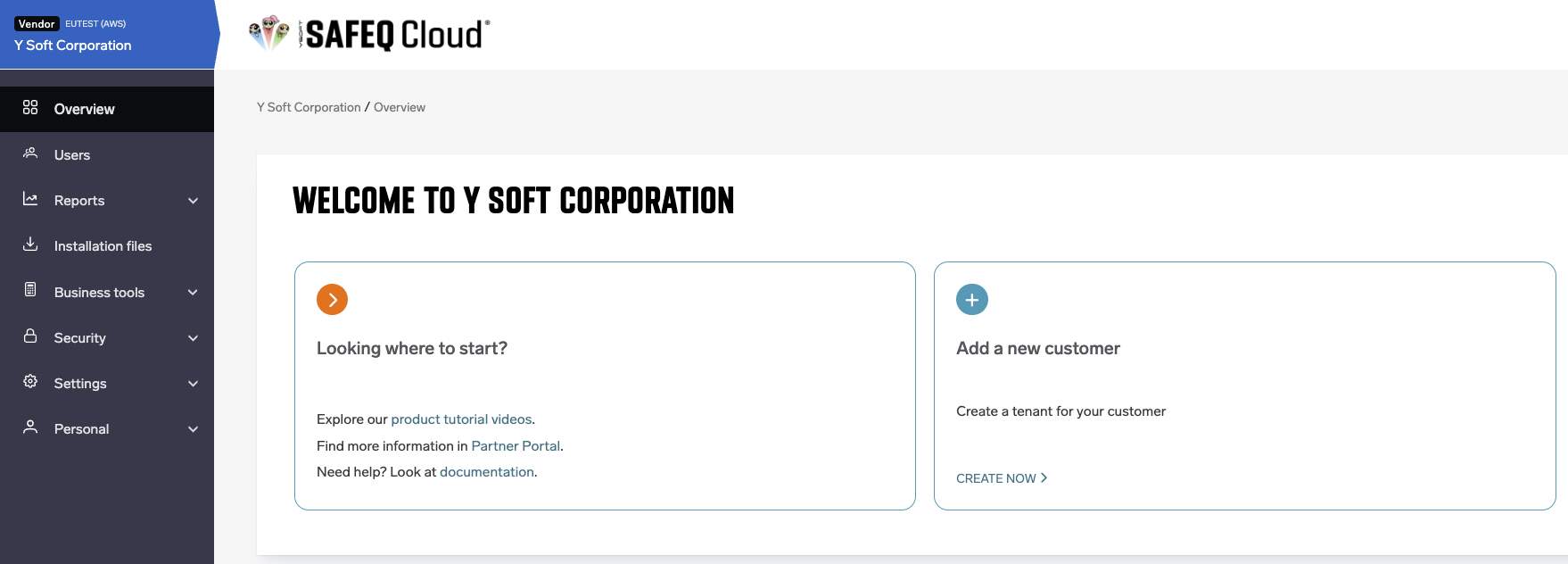
ℹ️ Updated navigation and menu design (HCP-17344)
The navigation and menu skeleton have been redesigned for a more consistent look and feel across the product family.
⚠️ Uploaded Excel documents now render in the correct language (HBT-6334)
An Excel workbook uploaded for printing is converted to PDF for output, but the conversion did not use the viewer's locale, so day and month names always rendered in English regardless of the workbook's own language. The conversion now uses the correct locale.
⚠️ Adding a single printer above the license limit no longer fails silently (HBT-6411)
Adding printers one at a time through the advanced form did nothing when the license limit had been reached, with no warning shown and no printer created.
⚠️ Deleting an email template in use no longer silently breaks the feature relying on it (HBT-6459)
An email template could be deleted even while it was still referenced by an account setting or a trigger, silently breaking that feature. Deleting a template now checks whether it is in use and warns before the deletion proceeds.
⚠️ Direct print queues created from an existing printer are no longer invisible to queue lookups (HBT-6653)
Creating a direct print queue on an existing printer, with the printer's own node selected in the object tree, placed the new queue under the wrong parent. The queue was created correctly but did not appear in the print-queues list, in queue pickers, or in job routing. The queue now appears wherever queues are listed.
⚠️ Norwegian is no longer rendered as English in the interface (HBT-6665)
Cloud Terminal updates
Some improvements and fixes require updated versions of Cloud Terminals. Please refer to the vendor-specific terminal release notes for details and required terminal versions.
Ricoh
⚠️ Landscape documents are stapled in the correct position (HBT-6213)
A multi-page landscape document sent from the desktop client and printed with stapling could be stapled in the wrong position instead of the position requested. Stapling now matches the requested position.
HP
⚠️ Document name is no longer missing when printed via a secure queue (HBT-6452)
A document printed through a secure queue in local storage mode could reach the terminal without its document name under some conditions. The document name is now preserved.
Canon
⚠️ A changed administrator password now takes effect immediately (HBT-6465)
Changing only the administrator password, without also changing the username, in the login application settings did not take effect — the original password remained in use. The new password now takes effect immediately.
Security
✅ Personal data is hidden from roles that are not permitted to see it (HCP-16515)
Until now, usernames and document names were anonymized only when a customer account had the Privacy setting enabled. A new permission, ViewUnmaskedPersonalData, now also controls this: a user whose role does not hold it sees anonymized values in reports, job lists and job search, and cannot open audit logs, regardless of the account’s own Privacy setting.
Other
ℹ️ Documentation now lists all built-in template variables (HBT-6585)
The documentation did not have a single conclusive list of the variables available for use in templates. A complete list of built-in variables, and where each can be used, has been added.
ℹ️ Documentation expanded to cover common support questions (HBT-6681)
Based on a review of a year of support consultations, the documentation has been expanded to answer several questions that recurred often enough to routinely need engineering involvement, so administrators and partners can find the answers directly.
2026.08.20
✅ Added feature
ℹ️ Improved/changed feature
⚠️ Bug fixed
⚠️ Secure print preferences no longer revert to a default profile (HBT-6451)
A defect in preference resolution meant that a user’s saved paper size and color settings could silently fall back to a default profile (Letter size, greyscale) after some time, with no indication that anything had changed; signing out and back in temporarily masked the problem. The underlying lookup and fallback logic has been corrected so a user’s own preferences are no longer silently overridden.
Admin Web UI
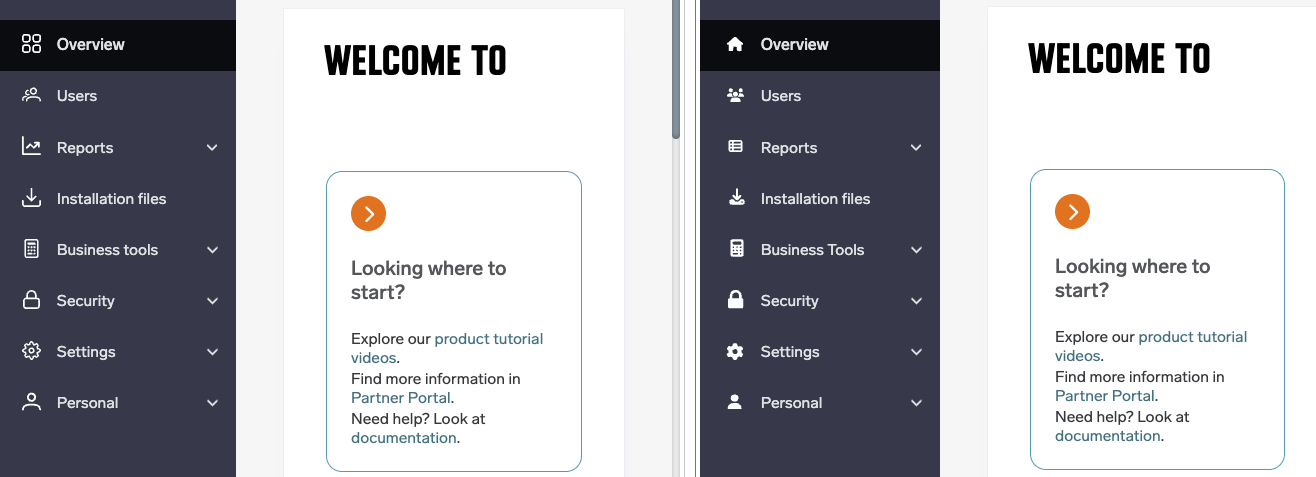
ℹ️ Refreshed navigation and menu appearance (HCP-17230)
The navigation menu and its icons, and the top bar logo layout, have been visually updated for a more consistent look across the product’s web interfaces.
Authentication
⚠️ Users are no longer logged out roughly every hour due to a stale directory connection (HBT-6528)
A pooled directory-server connection that had silently gone stale could be mistaken for the user not existing, which caused a token refresh to fail and the client to log the user out, typically about once an hour. The connection is now recognised as stale and refreshed, so this recurring logout no longer happens.
⚠️ User Groups reporting no longer drops group membership for users with no department set (HBT-6566)
A print or scan job’s group membership was only recorded if the user had a department value set; for users without one, all of their group memberships were silently omitted from reporting. Group membership is now recorded whenever it is available, regardless of whether a department is set.
PC Client
⚠️ Client no longer fails to connect when a proxy exclusion is configured for a domain (HBT-6512)
The client incorrectly checked proxy exclusion rules against the full host and port instead of the host alone, so a login could fail even though the destination was meant to bypass the proxy. Proxy exclusions are now evaluated correctly.
⚠️ Client no longer falls back to the system proxy when a PAC script requests a direct connection (HBT-6629)
When automatic proxy discovery returned a “no proxy” result from a PAC script, the client could not distinguish that result from a discovery failure, and fell back to system-wide proxy settings anyway. A successful “no proxy” result is now respected, and no further fallback is attempted.
⚠️ Client service on Linux and macOS now stops correctly when asked to (HBT-6636)
The client’s background service on Unix-based platforms did not respond to a stop signal, so commands to stop the service, for example during a controlled shutdown or restart, had no effect. The service now shuts down correctly when requested.
Cloud Terminal updates
Some improvements and fixes require updated versions of Cloud Terminals. Please refer to the vendor-specific terminal release notes for details and required terminal versions.
Konica Minolta
⚠️ Quick scan tiles no longer change position between logins (HBT-6540)
The order of quick scan workflow tiles on the terminal’s Quick Actions screen could change from one login to the next, making a tile appear to have moved or gone missing, an effect most noticeable with longer translated labels. Tile ordering is now stable across logins.
⚠️ Pressing Enter while filling a scan workflow field no longer logs the user out (HBT-6556)
On terminals using the web-based scan workflow form, pressing Enter in a single text field triggered the browser’s default form submission, which reloaded the page and logged the user out. Enter no longer submits the form, so the session is preserved.
Legacy terminal support
To support the ongoing migration away from legacy communication ports, the following terminals now proactively try to switch to port 443 on startup, rather than only falling back to it if the legacy port fails.
Sharp
ℹ️ Proactive migration to port 443 (HCP-17140)
The terminal now attempts to switch to port 443 on startup instead of waiting to fall back to it.
Konica Minolta IWS
ℹ️ Proactive migration to port 443 (HCP-17141)
The terminal now attempts to switch to port 443 on startup instead of waiting to fall back to it.
Scan Workflows
⚠️ SharePoint Online connector now resolves sites correctly for multi-geo Microsoft 365 tenants (HCP-17116)
The connector always addressed SharePoint sites relative to a tenant’s default region, so scans failed to reach a site hosted in a different region of a multi-geo Microsoft 365 tenant, with no available workaround. Sites are now addressed correctly for multi-geo tenants.
⚠️ A scan-to-download job that already succeeded is no longer marked Failed (HBT-6546)
If the email notification sent after a scan-to-download job completed took too long to send, the job could be reported as failed even though the document had already been stored and downloaded successfully, and its status was incorrectly reverted to Failed. The document’s status is no longer overwritten once it has reached a final state.
2026.08.06
Legend:
✅ Added feature
ℹ️ Improved/changed feature
⚠️ Bug fixed
Admin Web UI
✅ Search bar for print queues (HCP-16922)
The Print Queues list in the Web admin UI now has a search bar, matching the search already available for printers and embedded terminals. Administrators managing large numbers of queues can filter them by name or by the printer they belong to instead of scrolling the full list.
ℹ️ Higher default card length limit for new card templates (HCP-16998)
The default card length limit for newly created card templates has been raised from 20 to 64. The field now also shows a hint explaining that this value has to match across embedded terminals so that a card works on all devices.
⚠️ Printer status no longer stays OK after a terminal is uninstalled (HBT-6582)
After uninstalling a terminal from the Printers page, the printer kept reporting OK instead of Not installed whenever a user had signed in on that terminal before the uninstall, and stayed in that state for all later install cycles. The status is now reported correctly.
⚠️ Deleted certificates are no longer left behind as stale records (HBT-6558)
When all remaining certificates except the token signing certificate were deleted, either between synchronisation windows or within a single window, the certificate records were not removed and stale entries were left in place. Deletions are now synchronised correctly.
Authentication
⚠️ Email addresses can again be used as a user full name (HBT-6572)
Since the previous release it was no longer possible to create a user whose full name is an email address, through either the Web admin UI or the API, because of stricter validation introduced with additional cross-site scripting protection. Such users can be created again.
⚠️ Self-registration for session users can be disabled after a licence change (HBT-6511)
On accounts that were created with a direct-print-only licence and later moved to a licence with secure printing, the setting controlling self-registration of session users was hidden, so administrators could not turn it off even though it was still active. The setting is now available regardless of the current licence.
PC Client
⚠️ Print jobs no longer rejected as unsupported data on some Canon devices (HBT-6505)
PDF jobs produced by the client failed on several Canon imageRUNNER ADVANCE models with the panel error “Could not execute because the file contains unsupported data”, while the same document printed correctly when uploaded through the Web UI. The jobs produced by the client are now accepted by these devices.
⚠️ macOS client no longer changes the default printer on every sync (HBT-6516)
Printer synchronisation on the macOS client changed the default printer each time it ran. The behaviour has been narrowed so that it matches the Windows client.
⚠️ Large documents no longer crash the universal print driver (HBT-6418)
Printing documents of roughly one hundred pages or more could crash the driver because of a buffer overflow, with the job failing before it reached the queue. Large documents now print reliably. This fix requires an updated driver version.
⚠️ Advanced print options can be cleared again once they have been used (HBT-6417)
After an advanced option such as booklet or a setting on the Features tab had been selected once, it behaved as the effective default and could not be turned off, so later jobs were still produced with it even when the option was set to none. Each job now follows the option chosen for it. This fix requires an updated driver version.
ℹ️ Printer ports that the operating system still reports as in use are handled more cleanly (HBT-4578)
After a printer was removed, the Windows print spooler could continue to treat its port as in use until the spooler service was restarted, which surfaced as a misleading failure when the port was cleaned up. This situation is now handled without reporting a spurious error.
Secondary Gateway
⚠️ Re-registration now propagates the current credentials (HBT-6406)
When a bridge was re-registered after a failure, the new API key, registration code and endpoint identifier were not propagated, so the bridge kept using stale values and had to be recovered manually. Re-registration now updates them correctly.
⚠️ Bridges no longer end up without their site server (HBT-6497)
A timing problem during enrollment meant the notification that a device had registered could be processed before its configuration was stored, and was then discarded instead of retried. The bridge reported itself as operational while remaining offline under Endpoints and Servers, because the site server was never deployed. The notification is now retried.
Cloud Terminal updates
Some improvements and fixes require updated versions of Cloud Terminals. Please refer to the vendor-specific terminal release notes for details and required terminal versions.
Xerox
✅ Stapling and punching in the copy application (HCP-14696)
The copy application on the Cloud terminal now offers stapling and punching options. This matters where device locking is not available and kiosk mode is used to restrict unauthorised use of the device, because only the copy application is then available to users.
Ricoh
⚠️ Jobs from the native PostScript driver are processed correctly (HBT-6487)
Jobs produced by the vendor’s native macOS PostScript driver arrive without PJL headers, and the Cloud terminal assumed such jobs were PDF. The terminal now checks the actual format before processing the job.
⚠️ Card reader configuration works when port 80 is disabled (HBT-6243)
Configuring a card reader with the terminal deployment tool failed on devices that had port 80 disabled, even though only secured ports were expected to be used. The configuration now completes over a secured connection.
FUJIFILM BI
⚠️ Card authentication survives waking the device from sleep (HBT-6489)
When the secure print and scan application was set as the screen default, so that it relaunched automatically on wake, card authentication silently stopped working after the device woke from sleep and users could no longer sign in with a card. Card authentication now remains available.
Sharp
⚠️ Documents are no longer released multiple times (HBT-6561)
Tapping print all, or the print button in the job list, several times in rapid succession started the print process once per tap, so documents were released repeatedly and errors appeared on the panel. Repeated taps are now ignored while a release is already running.
HP Workpath
ℹ️ Device locking with the authorization agent service (HCP-17013)
The Workpath terminal has been updated to 1.6.3, which adds support for device locking through the authorization agent service. (By default it’s disabled, admins can activate it in app configuration in the Command Center)
2026.07.23
Legend:
✅ Added feature
ℹ️ Improved/changed feature
⚠️ Bug fixed
Admin Web UI
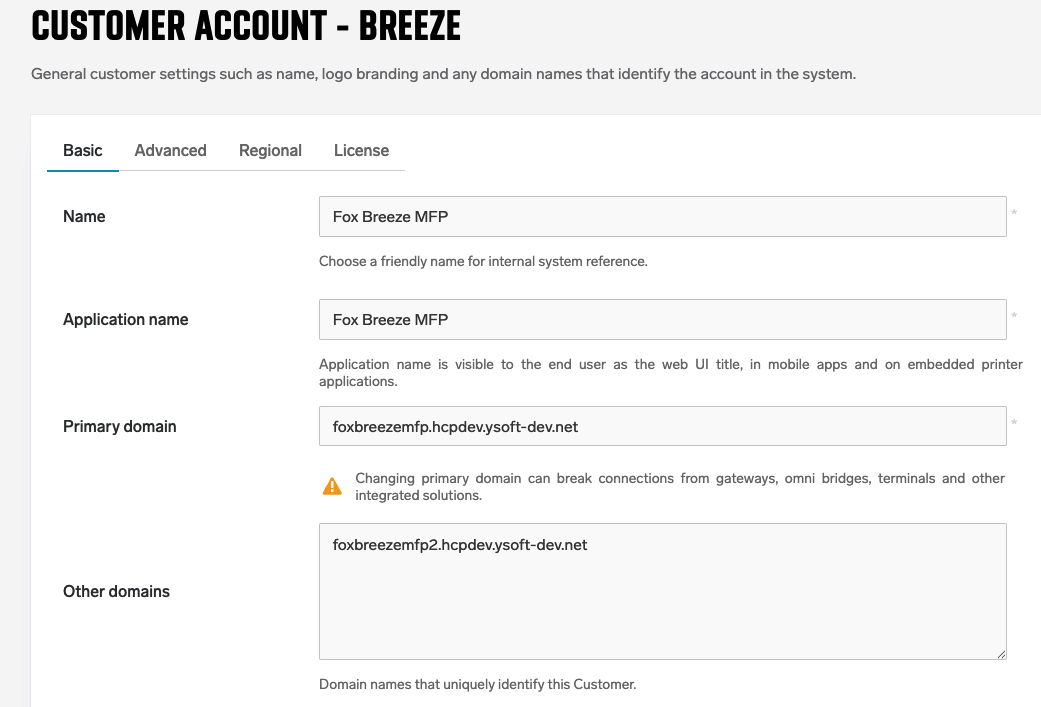
ℹ️ Primary domain is now explicit for multi-domain accounts (HCP-16916)
Accounts with multiple domains now have an explicit primary domain rather than one inferred from list order. Changing it prompts a confirmation, and the change is recorded in the audit log.
⚠️ Scheduled dashboard reports no longer arrive with a blank screenshot (HBT-6507)
Large scheduled user and printer email reports could include a completely blank screenshot due to a rendering race. The capture now completes reliably regardless of dashboard size.
⚠️ Document color-page detection corrected (HBT-4609)
Documents processed without native color detection support were being marked entirely as color pages, which could affect reported page counts. Detection is now accurate.
PC Client
⚠️ Fixed a crash after manual printer synchronization (HBT-6407)
The Windows client could crash immediately after a manual synchronization completed. The underlying issue has been resolved.
⚠️ macOS driver now supports borderless printing (HBT-6529)
Full-bleed content previously printed with an unwanted margin on all sides. Borderless paper sizes are now available.
Secondary Gateway
⚠️ Large print jobs routed via a secondary server no longer time out (HBT-6422, HBT-6436)
Larger jobs sent through a secondary server, or over port 443 with IPP authentication enabled, could fail partway through. The outbound request timeout has been corrected.
Authentication
⚠️ Fixed card login failure after card conversion on embedded terminals using a gateway (HBT-6502)
A card conversion could break subsequent card logins on embedded terminals connected via a gateway. Login now works reliably after conversion.
Cloud Terminal updates
Some improvements and fixes require updated versions of Cloud Terminals. Please refer to the vendor-specific terminal release notes for details and required terminal versions.
Xerox
⚠️ Corrected paper type for envelope printing (HBT-6395)
Selecting an envelope size when printing via Secure queue could result in plain paper being used instead of the configured envelope tray. The correct tray is now selected.
2026.07.09
Legend:
✅ Added feature
ℹ️ Improved/changed feature
⚠️ Bug fixed
Admin Web UI
⚠️ Remove icon is displayed again in the Locations edit panel (HBT-6482)
The remove icon is now is now displayed correctly.
⚠️ Guest self-registration shows the correct validity for short expirations (HBT-6356)
When a guest account's expiration was configured to less than 24 hours, the guest self-registration page displayed "0 days". The page now shows an appropriate time unit ("4 hours" or "1 day, 2 hours"), consistent with the guest activation emails.
⚠️ Corrected French translations for API key types (HBT-6469)
Several API key type labels (General, Embedded, Chrome extension, Edge) were translated incorrectly in French. The translations have been corrected.
⚠️ Recurring schedules calculate the next monthly run correctly (HBT-6503)
Recurring schedules (weekly / monthly / quarterly / yearly) now calculate the next run date correctly even around month boundaries. The scheduled runs now trigger on the right day.
⚠️ Container-level Printers view no longer reports a valid license as expired (HCP-16322)
Printers viewed at container level could display "Your license has expired" despite a valid account license, and the message persisted after a replacement license was applied. The license state is now displayed correctly.
PC Client
⚠️ Old client versions are removed after auto-update (HBT-5535)
After an automatic update, older client versions were sometimes left behind in the client folder. The client now reliably removes the previous version once the update has completed.
⚠️ Correct staple position for landscape jobs printed from macOS (HBT-6343)
Multipage landscape documents sent from the macOS client were stapled in the wrong position on Konica Minolta Cloud Terminals. Staple placement is now correct for landscape jobs.
HP
ℹ️ Additional logging for OxPD (HBT-5914)
Extended logging on the HP OxPD embedded terminal now captures more data.
Cloud Terminal updates
Some improvements and fixes require updated versions of Cloud Terminals.
Please refer to the vendor-specific terminal release notes for details and required terminal versions.
Canon
ℹ️ Canon Cloud Terminal uninstallation (HCP-16850)
Uninstallation is now fully integrated into the UI and into the Terminal Deployment Tool (TDT).
Other
Stability and security improvements (HBT-6148, HBT-6463, HBT-6464)
2026.06.25
✅ Added feature
ℹ️ Improved/changed feature
⚠️ Bug fixed
Admin Web UI
⚠️ MFP licence count now displayed in manage terminal modal (HBT-6414)
An issue where terminals could not be installed to printers without an embedded terminal type in the manage terminal modal has been resolved. The MFP licence count is now also shown in this modal. (HCP-16588)
⚠️ License violation grace period surfaced to administrators (HBT-6413)
Administrators are now notified of a license violation grace period before printing stops. Previously, the grace period was silent and admins were unaware until the printer ceased to function.
⚠️ Wrong timezone in PIN expiration notification email corrected (HBT-6443)
PIN expiration notification emails now use the correct timezone when displaying the expiration date and time.
⚠️ Enabling Direct print without a vendor no longer throws an exception (HBT-6445)
An issue where enabling Direct print on a printer that was added without a vendor caused an exception and saved the printer without a print queue has been resolved.
⚠️ Translation corrections in Japanese and other languages (HBT-6453)
Several incorrect Japanese translations in the document and reporting UI have been corrected, including mistranslations for "jobs" and "duplex". The welcome message now correctly includes the product name in all non-English languages. (HBT-6448)
⚠️ Minimum PC client auto-update version displayed consistently across languages (HBT-6371)
The minimum PC client version for auto-update was displayed inconsistently across different UI languages. This has been corrected so the same version is shown regardless of the active language.
PC Client
ℹ️ New channel mode port 443 check before migration (HCP-16645)
The PC client in channel mode now checks port 443 availability before attempting to migrate, reducing connectivity failures during transitions.
ℹ️ PC client now attempts port 443 migration from legacy gateway (HCP-16709)
A PC client connected to a gateway via legacy ports now correctly attempts to migrate to port 443 when the legacy ports are no longer available.
⚠️ PC client on macOS: high CPU and energy usage resolved (HBT-6437)
An issue where the macOS PC client caused abnormally high CPU and energy usage due to a continuous ThemeChanged event loop in the tray icon has been resolved.
Scan Workflows
ℹ️ Scan email templates improved for new customer accounts (HCP-16797)
Scan-to-email templates for newly created customer accounts have been improved to provide clearer and more complete email content out of the box.
⚠️ Scan-to-mail workflow no longer silently fails after logout race condition (HBT-6450)
A race condition where the finishScan call could be deferred behind an accounting cleanup and race a logout — resulting in a 403 error and the scan-to-mail workflow never triggering — has been resolved.
Secondary Gateway
⚠️ Edge gateway no longer gets stuck after prolonged health check failure (HBT-6419)
An issue where the edge gateway would get stuck and require a manual restart if its health check was unresponsive for 30 minutes or more — as observed after a datacenter outage — has been resolved. The gateway now recovers automatically.
Managed Print API
ℹ️ Terminal installation: serial number now required for TDT-installed devices (HCP-16757)
When installing terminals to printers that were added via the Terminal Deployment Tool, the serial number is now required, consistent with the behavior for other device types.
ℹ️ Manage terminal modal: improved error handling for unhappy paths (HCP-16587)
Additional error cases and unhappy paths in the manage terminal modal have been handled, providing clearer feedback when terminal installation encounters issues. (HCP-16586, HCP-16588)
Cloud Terminal updates
Some improvements and fixes require updated versions of Cloud Terminals.
Please refer to the vendor-specific terminal release notes for details and required terminal versions.
Xerox
⚠️ Xerox Gen 2 terminal no longer stuck on "Please wait" on devices without a scanner (HBT-6457)
Xerox Gen 2 Cloud Terminals on devices that do not have a scanner installed were getting stuck indefinitely on the "Please wait" spinner and never rendering the login screen. This has been resolved.
⚠️ Xerox AltaLink C82xx booklet center stapling now working (HBT-6441)
An issue where booklet center stapling was ignored on Xerox AltaLink C82xx devices — with the job printing and folding but no staples applied — has been resolved.
Canon
ℹ️ Canon Cloud Terminal installation time reduced (HCP-16658)
The installation time for the Canon Cloud Terminal has been significantly reduced, speeding up the deployment process.
HP Workplace
⚠️ HP Cloud Terminal now correctly switches to port 443 when legacy ports are cut off (HCP-16778)
An issue where the HP Cloud Terminal did not switch to port 443 when legacy ports were disabled has been resolved.
Other
Stability and security improvements (HBT-6428, HBT-6349, HBT-6390)
End of Life
ℹ️ End of life notice for Equitrac embedded clients (HCP-16724)
Equitrac embedded clients have reached end of life. Customers currently using Equitrac embedded integrations should plan their migration to supported alternatives.
2026.06.11
Legend:
✅ Added feature
ℹ️ Improved/changed feature
⚠️ Bug fixed
PC Client
ℹ️ More resilient login token refresh (HCP-15984)
The client token refresh logic now better tolerates short server or network outages, reducing unwanted logouts.
⚠️ Configuration profile is applied correctly on macOS (HBT-5248)
The configuration profile downloaded from the server was not reflected in the system print dialogs on macOS. Print settings defined in the configuration profile are now applied correctly.
⚠️ User stays logged in after installation and automatic update on macOS (HBT-4701, HBT-5871, HBT-6337)
After an automatic update, or shortly after installation in managed deployments, the client re-registered the endpoint and invalidated the user session, so users were unexpectedly logged out. The session is now preserved.
⚠️ Erroneous message at computer shutdown on Windows (HBT-5867)
Users no longer receive an error message from the client every time the computer shuts down.
⚠️ Connection to a secondary gateway with self-signed certificates (HBT-6396)
The client on Windows failed to connect to secondary gateways that use self-signed certificates. Gateway connectivity now uses native certificate validation, restoring support for these environments.
⚠️ Hotfix added later:
-
update to 2026.06.11 caused the PC client sync to change the default printer (HBT-6484) This is no longer happening.
-
Unattended installation on Mac PC client is now correctly recognized as a fresh installation. (HBT-6490)
Admin Web UI
✅ PC Client auto-update allows a delayed update cycle (HCP-16723)
It now offers two modes of operation:
-
Latest (default) — PC Clients update to the latest stable release, published alongside each server release. Updates are rolled out gradually and monitored.
-
Previous - PC Clients stay one release behind the latest and still update automatically with each new release. Switching from Latest downgrades all clients already running the latest release. Choose Latest to keep clients on the same version as the server.
⚠️ Add New service button respects permissions (HBT-6153)
Users without the permission to create a document output service no longer see a functional Add New button in the printer edit screen.
⚠️ Public API validates user details (HBT-6319)
The public API endpoint for updating users accepted invalid values (for example a non-numeric user validity), which could break the automatic removal of expired guest users for the whole environment. The input is now validated and the issue can no longer occur.
⚠️ License usage no longer counts deactivated printers (HBT-6409)
The periodic license recalculation incorrectly included deactivated printers, which could push an account into a false license-exceeded state. Deactivated printers are now excluded from the counts.
Printing
⚠️ Print jobs with large driver metadata (HBT-6372)
Print jobs sent from drivers producing large job metadata failed to spool. The metadata limit has been extended so these jobs now print correctly.
Cloud Terminal updates
Some improvements and fixes require updated versions of Cloud Terminals. Please refer to the vendor-specific terminal release notes for details and required terminal versions.
HP Workplace
⚠️ Scanned pages keep their original paper size (HBT-6140)
When scanning documents with mixed paper sizes, all pages in the output were formatted to the largest size. Each page now keeps its own paper size.
Other
Stability and security improvements (HBT-6273, HBT-6423, HBT-6376)
2026.05.28
Legend:
✅ Added feature
ℹ️ Improved/changed feature
⚠️ Bug fixed
Admin Web UI
🔄 Removal of PC Client Auto-update delay (HCP-16722)
Client updates are now distributed using a gradual rollout model, where updates are released in phases to subsets of devices and validated before reaching all clients. This approach improves overall stability and availability compared to updating all devices at once after a fixed delay.
💡 Impact
-
It is no longer possible to configure update postponement (e.g., delay by X days).
-
This change was not included in the original release notes.
💡 Next steps
-
Support for staying on current‑1 version is planned for upcoming releases.
ℹ️ Streamlined terminal management (HCP-16330) Terminal management has been consolidated into a single, redesigned flow. The legacy "Manage terminals" dialog and the separate "Find on my network" option have been removed in favor of the new tabbed "Add printer" and "Manage terminals" experience, which already covers auto-discovery and uninstall.
⚠️ Email to Print section on My Documents now has its own visibility permission (HBT-6061) The list of Email to Print addresses on the My Documents page is no longer shown based on the download permissions (ViewPcClientDownload / ViewMobileAppDownload). Its visibility now follows the dedicated Email to Print permission, so the section appears only for users who are actually allowed to use that feature.
⚠️ Non-functional options removed from My Documents for Container domains (HBT-6348) When an end user signed in through a Container-specific domain, the "Submit your documents" panel previously offered Email to Print, mobile/QR print, and PC Client options that do not work in that context. These elements are now hidden for Container domains to avoid confusion.
⚠️ Embedded configuration is preserved when creating output ports via the API (HBT-6255) Creating or updating an output port with an embedded terminal configuration ID through the public API no longer saves the port without that configuration. The embedded configuration provided in the request is now reliably attached.
⚠️ Restore-default-API-key action is no longer available at vendor level (HBT-6331)
The button to recreate the default API key was incorrectly available on vendor accounts. It is no longer shown, as a default API key should never be re-created at that level.
⚠️ Corrected Danish translation on the Create account screen (HBT-6363) A wrong Danish translation on the Create account screen has been fixed.
Printing
⚠️ ColorPrint restriction is now enforced for Direct print (HBT-6314)
When a role has ColorPrint restricted, the restriction was applied to Secure (pull) print but silently ignored for Direct (push) print, so colour jobs still printed in colour. The restriction is now enforced for both Secure and Direct print.
PC Client
⚠️ SSO session preserved when switching between Citrix session hosts (HBT-6198)
In pooled Citrix environments with a roaming profile, switching between session hosts could cause the PC Client to interpret a different install ID as a changed installation, delete the session files, and log the user out. This no longer happens, so SSO is retained across session hosts.
⚠️ WebSocket reconnect no longer appears as being logged off (HBT-6332)
A race condition with a stale session cookie after a WebSocket reconnect could make active users appear logged off during printing. The session is now handled correctly on reconnect.
ℹ️ PC Client logs now capture more diagnostic information (HBT-5322)
PC Client logging has been extended on both Windows and macOS — graceful start and stop of the client application and the client core service are now recorded, and session reuse messages provide more detail — making support investigations easier.
Security and stability improvements (HBT-6273, HCP-16246)
Cloud Terminal updates
Some improvements and fixes require updated versions of Cloud Terminals. Please refer to the vendor-specific terminal release notes for details and required terminal versions.
Canon Cloud Terminal
✅ Canon Cloud Terminal is now generally available (HCP-15351) The Cloud Terminal for Canon multifunction devices is now generally available to all accounts. A default Canon embedded application type is available out of the box, so administrators can deploy the terminal directly from the terminal configuration — no special enablement is required.
Xerox Gen 2 Cloud Terminal
⚠️ Booklet printing folds the whole stack correctly (HBT-6216)
Booklet jobs on Xerox AltaLink devices with a finisher were folding each sheet separately instead of folding the whole stack as a book. Booklet folding now behaves as expected for both push and pull print.
⚠️ Scan Workflow email search keyboard hides automatically (HBT-6358)
During an email search in a Scan Workflow on the Xerox Cloud Terminal, the on-screen keyboard stayed visible after the search ran, hiding the results. The keyboard now disappears automatically so the results are immediately visible.
Ricoh Gen 2 Cloud Terminal
⚠️ Advanced embedded license now usable for Ricoh printers (HBT-6336) Customers holding only an Advanced embedded (PMC) license, without a regular Embedded license, can now create and configure Ricoh embedded output ports with an Advanced terminal template. Previously the product behaved as if no embedded license were present.
Konica Minolta IWS Gen 2 Cloud Terminal
⚠️ Borderless print option now respected (HBT-6163)
The Konica Minolta IWS Gen 2 terminal now correctly honors the borderless print header, so jobs requesting borderless output are handled as expected.
2026.05.14
Legend:
✅ Added feature
ℹ️ Improved/changed feature
⚠️ Bug fixed
Admin Web UI
⚠️ Configuration Profiles link now opens the correct page (HBT-5876)
The "Configuration Profiles" link under Settings → Customer account → Regional → Default paper size now opens the PC Client → Configuration Profiles tab instead of a blank page.
⚠️ API key form no longer resets when enabling Automatic endpoint deletion (HBT-6247)
When creating or editing an API key, toggling Automatic endpoint deletion previously cleared the rest of the form (name and other options). The toggle now activates without resetting the surrounding fields.
PC Client
⚠️ PC Client refreshes proxy settings after a network change (HBT-6299) The PC Client now detects network changes — for example switching between Wi-Fi and Ethernet, or moving to a network with a different proxy — and refreshes its proxy configuration accordingly, instead of continuing to use the previously detected value.
⚠️ System printers preserved across concurrent RDP sessions on Windows (HBT-6308) A combination of token-refresh timing and a second user starting a fresh RDP session could cause the PC Client to misclassify a long-running remote session as local and delete the system printers, leaving the original user unable to print until they manually re-synced. Remote-session detection has been hardened so printers remain in place across these handovers.
⚠️ No spurious error notification while the PC Client is still connecting (HBT-6328) With session authentication enabled, the PC Client no longer surfaces a transient error notification when the login is initiated before the core service has finished connecting.
⚠️ Simplex jobs released as simplex with custom drivers (HBT-6222) Print jobs submitted as simplex through a secure queue using a custom driver are no longer silently released as duplex. Page format and number of copies are also correctly preserved when using non-default drivers.
Cloud Terminal updates
Some improvements and fixes require updated versions of Cloud Terminals.
Please refer to the vendor-specific terminal release notes for details and required terminal versions.
Xerox Cloud Terminal
⚠️ Reliable completion of rapid scan jobs (HBT-5748)
On Xerox AltaLink Cloud Terminals, submitting many scan jobs in rapid succession within a single user session could occasionally leave one job without a finish-scan notification, so the scan was not delivered (for example, not emailed). Scan completion is now reliably signaled for every uploaded job.
Konica Minolta Cloud Terminal
⚠️ Direct Print of uploaded PDFs is now correctly collated (HBT-6033)
PDF jobs uploaded through KM Direct Print are now collated by default, matching the behavior of secure print. Users no longer need to manually reorder pages when printing multiple copies.
Sharp Cloud Terminal ⚠️ Terminal initializes on devices without a scanner (HBT-6275) Sharp devices without a built-in scanner (for example BP-B547PW) no longer fail terminal initialization with an "Action not supported" error. Scanner-dependent widgets such as My scan workflows are now automatically hidden on these devices.
2026.04.30
Legend:
✅ Added feature
ℹ️ Improved/changed feature
⚠️ Bug fixed
✅ PIN expiration notification email (HCP-16144)
Users now receive an automatic email when their Cloud PIN code is about to expire under the configured PIN expiration policy, so they can regenerate a new PIN before authentication is disrupted. Users who intentionally have no PIN configured (e.g., card-only users) are not notified.
Admin Web UI
⚠️ Trigger-based document assignment now persists in the database (HBT-5541)
The "Assign document" action in trigger rules now correctly updates the document record in the database, so the assignment is reflected across the system.
⚠️ Removing a server preserves services shared with other servers (HBT-6288)
Removing a server through the Admin Web UI no longer cascades and deletes services that are also associated with other servers — only services unique to the removed server are cleaned up.
⚠️ Inherited role assignments are now protected from deletion (HBT-6249)
The Web UI now prevents administrators from deleting inherited role assignments, which previously led to inconsistent permissions.
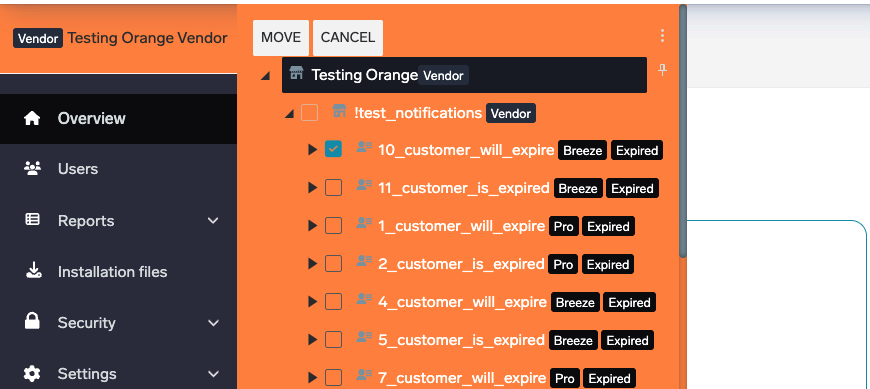
ℹ️ Improved "Move selected to" modal in Organize Tree (HCP-16263)
The "Move selected to" modal in the Organize Tree view has been refreshed for clearer navigation and easier tree selection.
PC Client
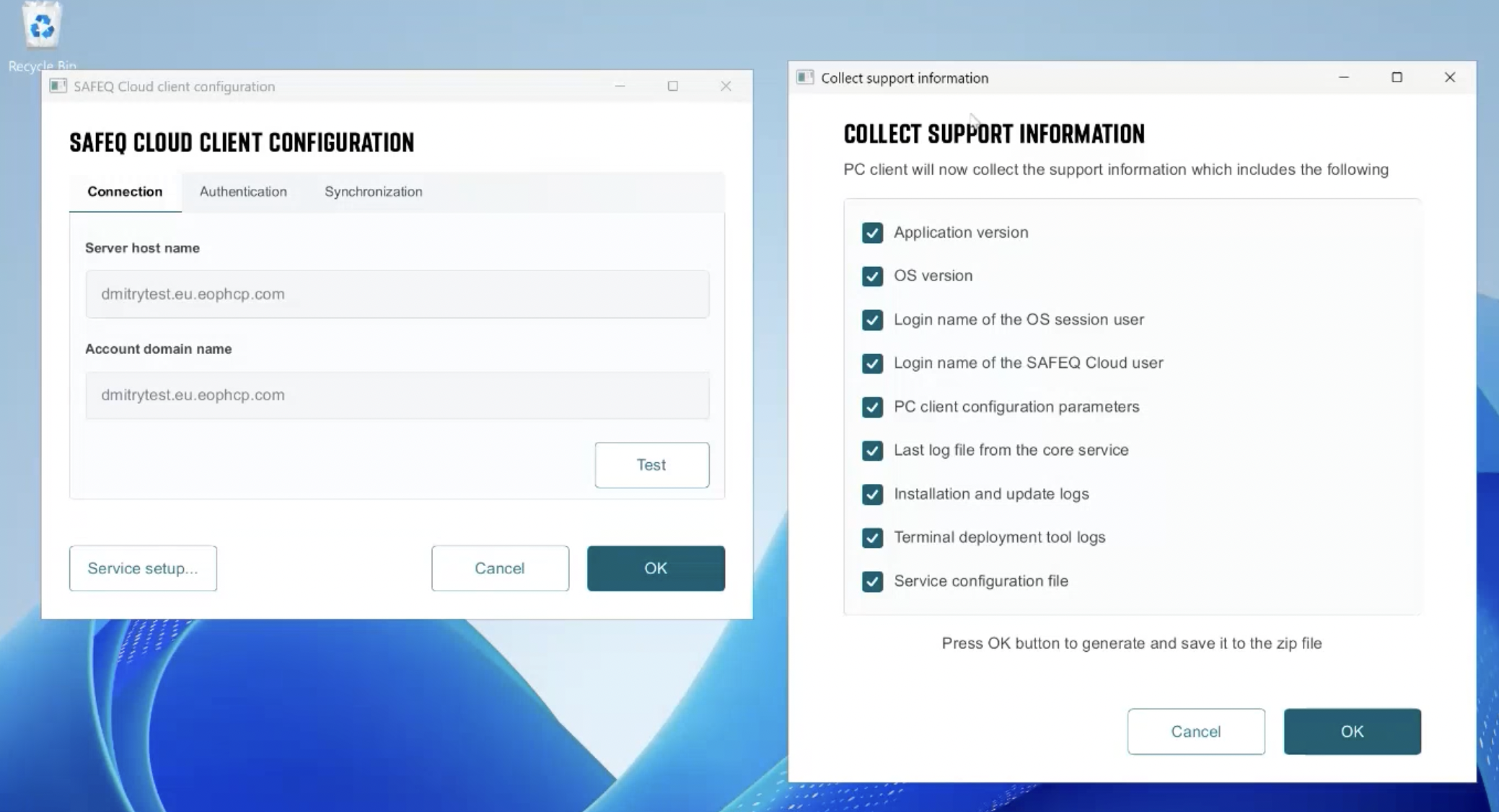
✅ Modern UI in PC Client (HCP-16239)
A modernized PC Client user interface for configuration lands in 2026.04.30 including system dark mode support.
ℹ️ Terminal Deployment Tool (TDT) for macOS now bundles its own Java runtime (HCP-15687)
The macOS distribution of the Terminal Deployment Tool now ships with a bundled Java runtime, removing the need to install or configure Java separately before running TDT.
⚠️ Reliable write permissions on the TDT extraction folder (macOS) (HBT-6272)
The TDT installer now correctly applies write permissions to its extracted directory on macOS, so subsequent operations no longer fail with permission errors.
⚠️ Print queue installation now succeeds in Windows Protected Print Mode (HBT-5966)
Print queues now install reliably on Windows machines that have Protected Print Mode enabled.
⚠️ Uninstaller cleans up the installation folder reliably (HBT-6134)
The PC Client uninstaller now removes empty installation folders properly, even when the working directory is locked or the installation path uses symlinks with trailing backslashes.
⚠️ Desktop shortcuts refreshed after PC Client upgrade (HBT-6262)
Shortcut targets are refreshed during PC Client updates so they no longer point to old, removed binaries after an upgrade.
⚠️ Silent Windows installs respect the configured connectivity port (HBT-6267)
Silent Windows installations no longer overwrite the configured single-port setting to 443. On-premises gateways that expose the Cloud API only on port 7300 continue to work after a silent install.
Authentication
⚠️ Office 365 messaging works when Entra ID UPN differs from primary email (HBT-6199)
OAuth2 authentication for Office 365 messaging now succeeds for accounts whose Entra ID userPrincipalName (UPN) differs from the primary email address.
Cloud Terminal updates
Some improvements and fixes require updated versions of Cloud Terminals.
Please refer to the vendor-specific terminal release notes for details and required terminal versions.
Xerox Cloud Terminal
⚠️ Advanced finishing options for pull-printed jobs (HBT-5383)
Stapling, punching, and other advanced finishing options now apply correctly when pull-printing on Xerox Cloud Terminal, completing the finishing-option support introduced in earlier releases.
⚠️ Cancel print job returns the device to its idle state (HBT-6276)
Cancelling a print job on Xerox AltaLink C/B82xx no longer leaves the device stuck in "Cancelling…" until sleep mode kicks in. The device returns to the home screen immediately after cancel.
FUJIFILM BI Cloud Terminal
⚠️ Color print jobs on monochrome printers (HBT-5620)
Print jobs containing color content can again be released through FUJIFILM BI Cloud Terminal when the printer is configured as monochrome.
Konica Minolta Cloud Terminal
⚠️ Page counts for KM Universal PS print jobs (HBT-6233)
Page counting for jobs printed through the KM Universal PostScript driver now reports the correct number of pages instead of always reporting 0.
Ricoh Cloud Terminal
⚠️ Corrected text in the Scan Workflow help notice (HBT-6219)
A typo in the Scan Workflow help notice on Ricoh Cloud Terminal has been corrected.
Secondary Gateway
⚠️ Gen 2 terminal authentication on secondary gateways (HBT-6257)
A regression introduced in earlier 2026.03 builds caused all Gen 2 cloud terminal requests on a secondary gateway to fail with HTTP 500. Licensing checks are now correctly forwarded from the secondary to the primary, and Gen 2 devices on secondary gateways operate normally again.
Legacy terminal support
ℹ️ Legacy terminals are no longer offered for new tenants (HCP-12891)
New tenants can no longer select or configure legacy embedded terminals (HP Workpath Gen 1, KM IWS Gen 1, Ricoh SOP Gen 1). Existing tenants who already have at least one embedded profile using a legacy terminal continue to work and can create additional profiles with the same configuration. Affected legacy clients are now marked (DEPRECATED) in the Web UI.
Security
⚠️ Disabled unauthenticated WebDAV endpoint on primaries (HBT-6231)
The legacy WebDAV endpoint used by older Gateway-embedded terminals (https://<primary>:7301/webdav) was previously reachable without authentication on primary servers. This endpoint is now disabled on primaries (it remains available where Gateway-embedded terminals require it). Konica Minolta and Xerox cloud terminals are unaffected — they have always used a separate, authenticated WebDAV server on ports 8711/443.
2026.04.16
Legend:
✅ Added feature
ℹ️ Improved/changed feature
⚠️ Bug fixed
Admin Web UI
ℹ️ Updated customer tree loading spinner (HCP-16229)
The customer tree now uses the new unified loading spinner when expanding nodes, improving visual consistency across the Web UI.
⚠️ Resolved empty screenshots in scheduled reports (HBT-6207)
Scheduled reports sometimes delivered empty screenshot/chart sections even though the Excel data was correctly populated. Screenshots are now rendered and included as expected.
⚠️ Return to printer list after saving a printer with advanced settings (HBT-6242)
Saving a printer while the "Show advanced settings" panel was open no longer leaves the administrator on a blank form — the user is correctly returned to the list of printers.
⚠️ Correct API key stored in token when additional API-key values are used (HBT-6184)
When logging in with an additional value of an API key, it could previously store the original API-key value in the access token, leading to "API key mismatch in token" errors on subsequent calls. The token now correctly records the value that was actually used
PC Client
⚠️ Windows installer: reliable handling of repeated reinstalls (HBT-6125)
The Windows installer now detects existing installation directories more reliably (wildcard check) and, on a second same-version collision, shows a clear error instead of silently overwriting the previous install.
⚠️ MacOS auto-update now respects uninstaller removal (HBT-6214)
Customers who deploy a skip_uninstaller flag (or who have manually removed the GUI Uninstaller) no longer have the uninstaller re-added by auto-update. The flag is treated as the source of truth.
Chrome Extension
⚠️ Loading indicator shown while long requests are processed (HBT-5842)
The Chrome extension now shows a loading indicator when a request takes longer than expected, instead of appearing unresponsive.
Cloud Terminal updates
Some improvements and fixes require updated versions of Cloud Terminals.
Please refer to the vendor-specific terminal release notes for details and required terminal versions.
Xerox Cloud Terminal
⚠️ Stapling finishing option on Xerox VersaLink (HBT-5521)
Stapling jobs now use the correct Xerox PJL command (@PJL SET STAPLE=TOPLEFT) on VersaLink devices — stapling is applied instead of silently ignored.
⚠️ Workaround for slight down-scaling of DOCX pull-prints on Xerox (HBT-6206)
Administrators can now configure an EOPSCALE trigger to counter the slight down-scaling that could occur when DOCX jobs submitted via the Universal Print Driver were pull-printed on Xerox cloud terminals, restoring full-size output.
ℹ️ Xerox Cloud Terminal reports device status (HCP-16116)
Xerox Cloud Terminal now reports device model, firmware and status information aligning its reporting with other vendor terminals.
HP Workplace Cloud Terminal
ℹ️ HP Workplace terminal reports device status (HCP-16162)
HP Workplace terminal now reports firmware version, model, and device information once a day.
Ricoh Cloud Terminal
⚠️ Terminal version refreshed on Printers page after upgrade (HBT-6108)
After upgrading a Ricoh Cloud Terminal (for example via TDT), the Printers page now shows the new terminal version after the next user login, instead of keeping the previous version.
Security
⚠️ Improved secrets masking (HBT-6192, HBT-6241)
2026.04.02
Legend:
✅ Added feature
ℹ️ Improved/changed feature
⚠️ Bug fixed
Admin Web UI — Manage Terminals
✅ Kiosk mode installation via Manage Terminals on Xerox (HCP-16078)
With a new toggle box in Manage Terminals interface administrators can now deploy kiosk mode directly.
⚠️ Corrected default template assignment during terminal installation (HBT-6189)
When installing terminals via Manage Terminals, the default terminal template is now correctly assigned to discovered printers.
Scan Workflows
✅ Autocomplete and new metadata variables now generally available (HCP-16043)
The autocomplete selector and new metadata variables in scan workflows. See (2026.10.01) Workflow variables
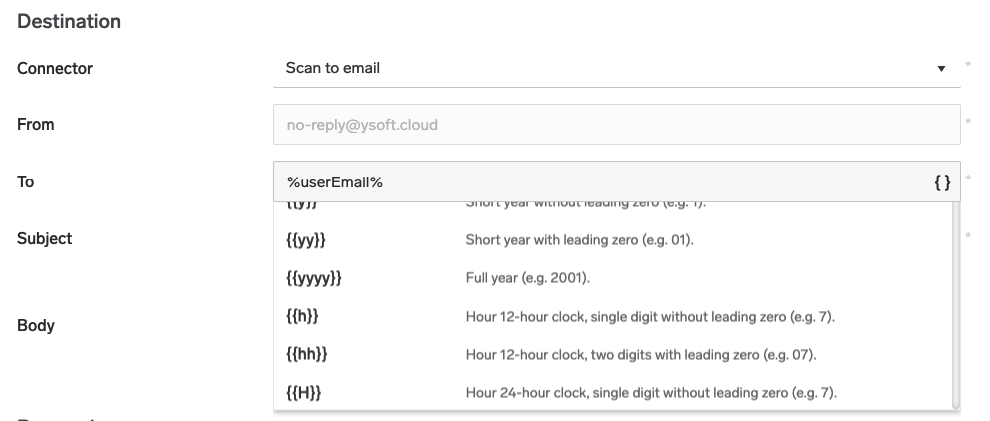
✅ Timezone configuration at account level (HCP-16042)
Administrators can now configure a timezone at the account level, with the option to override it at child levels. The timezone respects daylight saving time and clearly indicates the current UTC offset. If no override is set, child accounts inherit the parent's timezone setting.
Note: this settings apply to the scan workflows only and will be extended for other parts of the system in the future.
Admin Web UI — General
⚠️ Improved dynamic translations (HCP-15976)
Fixed an issue where certain UI elements were not translated when switching the page language. All translatable resources now update correctly without requiring a page reload.
⚠️ Fixed UI refresh loop (HBT-5824, HBT-6116)
Resolved an issue where the Web UI could enter a constant refresh loop, preventing users from interacting with the interface.
⚠️ Fixed "Create new..." button toggle behavior (HBT-5602)
The "Create new..." dropdown button in the Web UI header now correctly toggles on repeated clicks or hover.
Cloud Terminals
Some improvements and fixes require updated versions of Cloud Terminals.
Please refer to the vendor-specific terminal release notes for details and required terminal versions.
Xerox Gen 2 Cloud Terminal
Error display when card service is unavailable (HCP-15667)
Xerox cloud terminals now display a clear error message when the card service is down or experiencing connectivity issues, instead of silently failing.
⚠️ Corrected FIFO print order on "Print all" (HBT-6169)
Jobs are now released in the correct first-in, first-out order when using the "Print all" button.
Other
Reduced Entra ID throttling impact (HBT-6234)
Updated the Microsoft authentication library (MSAL) to the latest version, reducing throttling impact on service accounts during card registration with incorrect passwords.
⚠️ Corrected PDF conversion for high bit-depth images (HBT-6164)
Document conversion to PDF now correctly handles images with color depth greater than 8 bits per channel (e.g., 16-bit PNG from iPhone, 16-bit TIFF).
⚠️ Corrected document deletion on older secondary servers (HBT-6202)
Resolved an issue where document delete operations could fail on older secondary servers with an "Account not found" error.
⚠️ Security and stability improvements (HBT-6212, HBT-6121, HBT-6122, HBT-6152, HBT-6190, HBT-6173, HBT-6179)
Various security and stability improvements have been applied, including fixes for installer reliability, certificate configuration, and internal resource management.
2026.03.19
Legend:
✅ Added feature
ℹ️ Improved/changed feature
⚠️ Bug fixed
Legacy CDN Domain Retirement
Effective April 16, 2026, Cloud is retiring the legacy CDN domain cdn.everyoneprint.com and moving to cdn.ysoft.cloud.
Customers using explicit firewall exception rules for CDN traffic must update their allowlists to include cdn.ysoft.cloud. Otherwise, PC Client auto-updates and website downloads may no longer work after the transition.
Admin Web UI
✅ Manage Terminals now available for all license types (HCP-15711)
The Manage Terminals feature is now accessible for all license types.Terminal management is available at the Customer and Container level.

✅ Location-based terminal management (HCP-15713)
Administrators can now manage terminal deployments filtered by location. When a PC Client has a location defined, the Manage Terminals modal displays only printers assigned to that location, supporting multi-location deployments with overlapping printer IP ranges.
Pre-filled credentials in Terminal Deployment Tool (HCP-15865)
The Terminal Deployment Tool modal now automatically pre-fills the username and password from the terminal template, reducing manual input during terminal installation.
Terminal deployment guide accessible for all licenses (HCP-15765)
The manual deployment guide for Konica Minolta and HP terminals is now available regardless of the license type.
Default watermark trigger for all accounts (HCP-15898)
All accounts now include a default watermark trigger (disabled by default), serving as a ready-to-use template that administrators can enable and customize.
Improved audit log user identification for Entra ID (HBT-6110)
Audit logs now correctly display the authenticated user's name for Entra ID authentication, even when the user identity is resolved after the initial request.
⚠️ Corrected savings report calculations (HBT-6064)
Saved sheets in the Savings report are now calculated correctly, accounting for the number of copies when determining total printed sheets.
⚠️ Corrected documentation link in Audit logs (HBT-6181)
The link to documentation from the Reports → Audit logs page has been corrected.
⚠️ Reduced duplicate feedback messages (HBT-6131)
Saving services no longer displays multiple duplicate success messages.
PC Client
✅ Automatic endpoint cleanup for reimaged environments (HCP-15046)
A new option in API key settings allows administrators to configure automatic expiration of endpoints after a defined period. This is useful for Citrix or other virtual environments where instances are periodically reimaged, preventing the accumulation of stale endpoints.
⚠️ Installer now prevents parallel installations (HBT-6128)
The PC Client installer now detects if another instance is already running and prevents parallel installations, avoiding potential race conditions during service configuration and file operations.
⚠️ Resolved installation directory lock during OAuth login (HBT-6135)
The browser window opened for OAuth2 login no longer locks the PC Client installation directory, preventing issues with uninstalling or updating the client.
⚠️ Corrected EULA display in macOS installer (HBT-6156)
The EULA in the macOS Cloud Client installer is now displayed correctly.
⚠️ Corrected German translations (HBT-6161)
German translations in the PC Client have been corrected, including proper capitalization and grammar.
Cloud Terminal updates
Some improvements and fixes require updated versions of Cloud Terminals.
Please refer to the vendor-specific terminal release notes for details and required terminal versions.
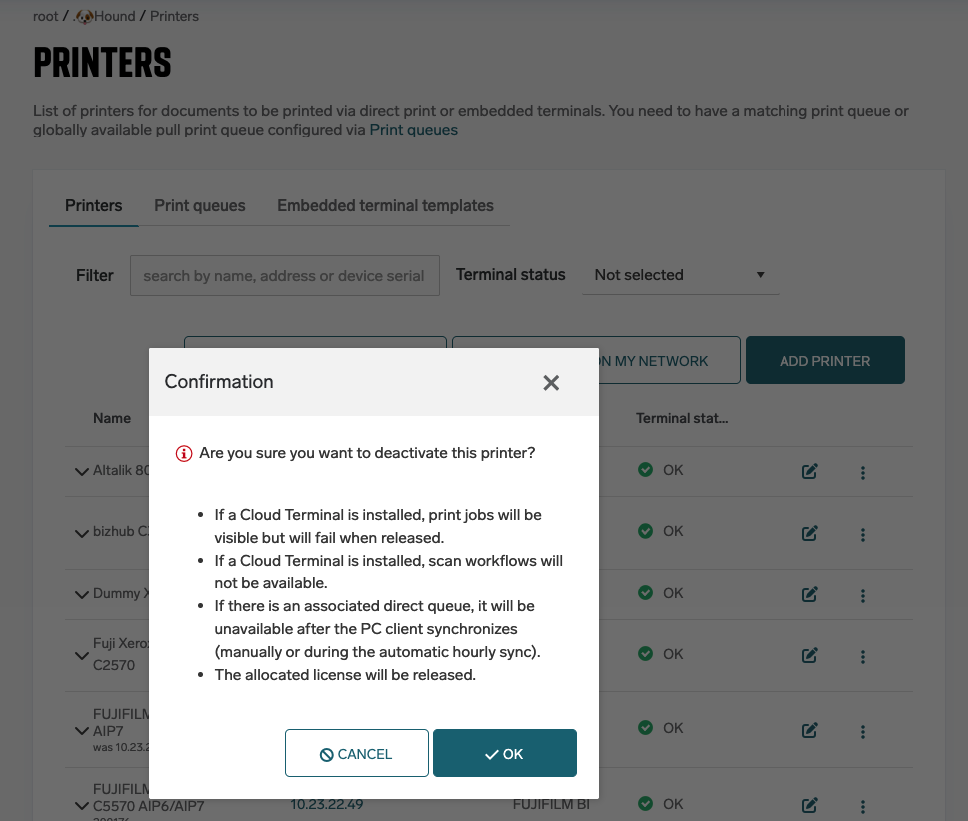
Expired or deactivated printers now restrict print and scan operations (HCP-15669)
When a printer is expired or deactivated, releasing print jobs from cloud terminals is now blocked with a clear error message. Scanning features are hidden for expired printers, preventing users from attempting operations on unavailable devices.
Konica Minolta IWS Terminal
⚠️ Corrected media type handling in cloud storage mode (HBT-6109)
Certain media types (such as thick paper or recycled) are now correctly applied to print jobs on KM IWS Gen2 terminals in cloud storage mode.
⚠️ Prevented registration of blank card numbers (HBT-6174)
KM IWS terminals no longer allow registering card numbers consisting entirely of zeros, which represent unprogrammed or empty card reads.
Ricoh Cloud Terminal
⚠️ Corrected stapling position for landscape documents (HBT-6117)
Stapling now correctly respects document orientation when using PostScript print protocol.
Sharp Cloud Terminal
⚠️ Fixed scaling of borderless documents (HBT-6162)
Pull printing no longer scales down borderless documents. The Fit-to-Page option is disabled when borderless printing is active.
Scanning
⚠️ Improved temporary file cleanup (HBT-6188)
Temporary files created during multi-page scan separation by barcode are now properly cleaned up after the workflow completes.
Other
Faster MyDocuments page for large environments (HBT-5745)
The MyDocuments page now loads significantly faster for customers with a large number of printers by optimizing how terminal configuration data is retrieved.
Improved client secret security (HBT-6013)
Client secrets configured in Authentication Providers settings can no longer be revealed after saving. The reveal icon has been removed and secrets are permanently masked once saved.
⚠️ Corrected page size for uploaded office documents (HBT-5749)
The output page size is now correctly applied when uploading office documents for printing.
⚠️ Corrected copy count with cloud storage and third-party drivers (HBT-6076)
Print jobs sent via the PC Client in cloud storage mode using non-standard drivers now correctly apply the specified number of copies.
⚠️ Security and stability improvements (HBT-6172, HBT-5965, HBT-5875)
Various security and stability improvements have been applied, improved Entra ID token caching to prevent rate limiting under high load, and infrastructure updates.
2026.03.05
Legend:
Added feature
Improved/changed feature
Bug fixed
Dispatcher Paragon Cloud Client
Configurable delay for client auto-updates (HCP-15771)
Client auto-updates can now be delayed by up to 240 hours (10 days). This provides administrators with greater flexibility to control update timing and reduce potential disruption.
Improved security of automatic terminal authorization (HCP-15769)
The automatic authorization process for terminals installed via the Terminal Deployment Tool (TDT) has been redesigned to reduce the authorization window and improve security.
Various Fixes (HBT-6079, HBT-5365)
The MacOS client installer no longer creates an unintended /Applications/Contents folder during installation.
An issue where MacOS client auto-updates could cause users to be logged out has been resolved, ensuring uninterrupted user sessions during updates.
Mobile App
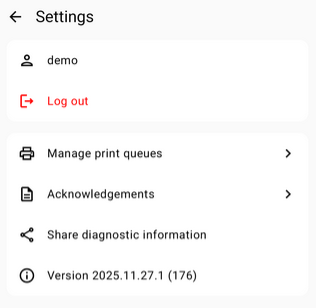
Collect support information option for Android users (HCP-15739)
Android users can now use a new “Collect support information” option to gather diagnostic data. This simplifies troubleshooting by allowing users to easily provide relevant information when reporting issues.
Improved mobile print connectivity stability (HBT-5982)
Improved stability of mobile printing connectivity to ensure the mobile application reliably communicates with print services using standard HTTPS connections.
Admin Web UI
Automatic printer discovery on the network (HCP-15642)
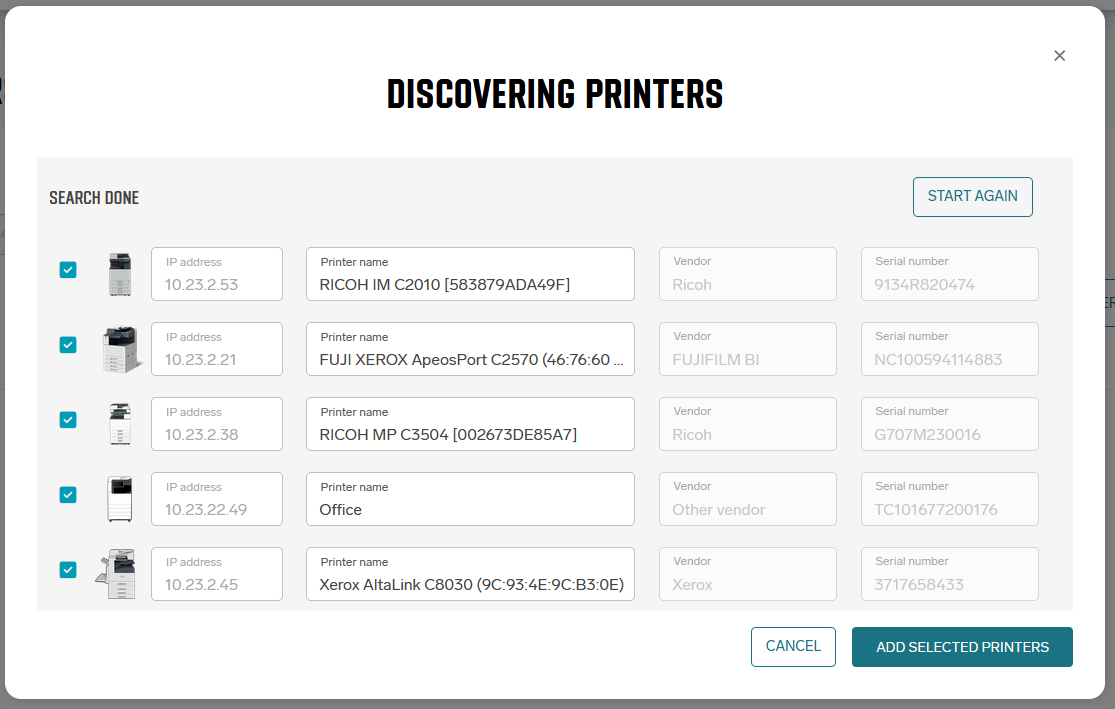
Administrators can now discover printers on the local network using the Printer Discovery Tool. After starting discovery from the Printers page, detected printers are displayed and can be selected and added directly. A direct print queue is automatically created for each added printer, and the printer is assigned to the PC’s location if one is defined.
-
For more details, see Printer Discovery
Various Fixes (HBT-6091, HBT-6024, HBT-5953,HBT-6058)
Resolved an issue where some print jobs could appear twice in document reports.
Document reports can now be successfully exported even when covering longer time ranges.
Uploading DOCX files now correctly displays the number of pages in the document.
Document assignment using triggers now works reliably also for users authenticated through non-local authentication providers.
Cloud Terminal updates
Some improvements and fixes require updated versions of Cloud Terminals.
Please refer to the vendor-specific terminal release notes for details and required terminal versions.
FUJIFILM BI Cloud Terminal
Improvements to accounting accuracy, connectivity handling. (HCP-15187, HBT-6112, HBT-5909)
Sharp Cloud Terminal
Improvements to print job release performance, packaging reliability, and dependency security updates. (HCP-14653, HBT-6105, HBT-5804)
Ricoh Embedded Terminal
Added option to hide Scan Workflow from the device interface. (HCP-14778)
Konica Minolta IWS Terminal
Fixed firmware version reporting in SAFEQ Cloud. (HBT-6115)
Xerox Pure Cloud Terminal
Improved handling of print jobs completed with device-side errors. (HBT-5615)
(Security Advisory) The card enrollment process has been improved to correctly handle multiple user swipes on all cloud embedded terminals.
We have enhanced the card enrollment workflow to improve resilience in cases where users did not complete the enrollment session.
Previously, incomplete enrollment sessions could, in rare circumstances, result in an unintended card-to-user association.
Update to the latest version of all respective embedded terminals is recommended.
Correct accounting for public user jobs on legacy Konica Minolta OpenAPI terminals (HBT-5645)
Legacy Konica Minolta OpenAPI terminals now correctly handle accounting for documents released under a public user. Activities are no longer counted based on device counters and only authenticated user activity is included in reports.
Other
Improved font support for uploaded and emailed print jobs (HBT-5984)
Additional fonts have been added to improve rendering accuracy when printing documents uploaded through print job upload or email
Improved reliability of license expiration notifications (HBT-6139, HBT-6114)
The process that sends license expiration and account removal notifications has been improved to prevent unexpected failures and ensure emails are reliably delivered.
Improved compatibility with OIDC when using Gateway (HBT-6056)
Using Gateway with an OIDC identity provider now works correctly.
Corrected Azure App permissions for Entra ID (HBT-4916)
Permissions for the Azure application integrated with Microsoft Entra ID have been corrected to ensure proper authentication and integration behavior.
Security and stability improvements (HBT-6130, HBT-6103, HBT-6101)
Various improvements were implemented to enhance system stability and security, including fixes for edge cases in authentication token handling and infrastructure scaling improvements.
Infrastructure improvements were also applied to ensure automatic scaling of OCR processing resources under load.
2026.02.19
Legend:
Added feature
Improved/changed feature
Bug fixed
Admin Web UI
Configurable card length limit
The card number length is no longer restricted to 20 characters. Administrators can now configure the maximum card length directly in the device template settings.
This provides greater flexibility for environments using longer card identifiers. (HCP-15623)

Various user interface improvements
Multiple UI refinements have been implemented to improve usability, consistency, and overall experience across the Admin Web UI. (HBT-5885, HCP-15662, HBT-6042, HCP-15720, HCP-15708, HBT-6077, HBT-5979, HBT-5746)
Improved watermark compatibility with special PDF characters
Watermarks containing special PDF characters are now generated correctly. This ensures consistent output and prevents formatting issues in printed documents. (HBT-6078)
Correct display of delete button for user documents
The delete button for user documents is now displayed correctly in the interface, improving usability and document management. (HBT-6072)
Dispatcher Paragon Cloud Client
Reliable client connectivity on Windows 11 23H2
Client connectivity now works correctly on Windows 11 version 23H2. This issue has been hotfixed to ensure stable operation on the latest Windows release. (HBT-6062)
More reliable unattended PC Client installations
Unattended PC Client installations now skip server connectivity checks. This prevents silent installation failures when the server is temporarily unreachable and ensures more reliable scripted or automated deployments. (HBT-5899)
Optional macOS GUI uninstaller component
The macOS GUI uninstaller is now an optional installation component. Administrators or users can choose whether to include it during installation.
Installer logic has also been improved to correctly handle updates and rollbacks regardless of whether the GUI uninstaller is present. (HBT-5893)
Xerox Gen 2 Cloud Terminal
Improved card enrollment reliability
The card enrollment process has been improved to correctly handle multiple user swipes.
Previously, if a user initiated enrollment with an unknown card and left the screen unfinished, a second user swiping their card immediately afterward could have their swipe ignored. If the second user completed the process, the first user’s card could mistakenly be enrolled. (HBT-5905)
Improved scanning performance on Xerox VersaLink devices
Scanning performance has been optimized on Xerox VersaLink devices, resulting in faster and more responsive scan operations. (HBT-6009)
Improved reporting of jobs completed with device errors
Print jobs that are completed on the device with an error condition — for example, when duplex printing is requested but not supported by the device — are now correctly reflected in reports. (HBT-5615)
License expiration notifications
More detailed license and tenant expiration emails
License expiration and customer tenant deletion notification emails now inform also about trials and have been significantly improved to include clearer and more detailed information.
This helps administrators better understand timelines and required actions. (HCP-15726)
Other
Updated KM OpenAPI terminal logo
The legacy KM OpenAPI terminal logo has been replaced with the updated version to ensure visual consistency. (HBT-5993)
Chrome extension user interface improvements
Several improvements have been made to the Chrome extension user interface to enhance usability and consistency. (HBT-6071)
2026.02.05
Legend:
Added feature
Improved/changed feature
Bug fixed
Dispatcher Paragon Cloud Client
Smaller and faster client installation
The client installer is now smaller because Ghostscript is no longer included by default. It will be downloaded automatically only when needed — for example, if you choose it during installation or when an update requires a newer version. This helps reduce installation time and disk usage. (HCP-15499)
Improved experience in Citrix environments
User roaming profiles are now supported across multiple Citrix instances. This means your client settings can follow you when you move between different Citrix servers, providing a more consistent experience. (HCP-15411)
More control over updates in virtual environments
Auto-update can now be enabled or disabled in virtual environments (such as Citrix, RDS, or remote desktop sessions). It is disabled by default, as updates in these environments are usually managed centrally by IT administrators. This helps avoid unnecessary network usage and reduces the risk of temporary printing disruptions. (HCP-15457)
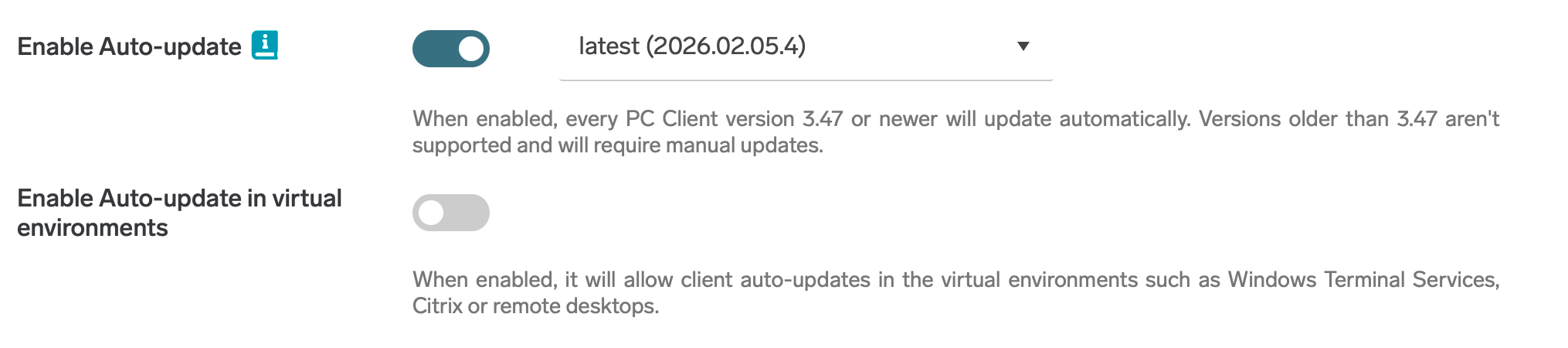
Improved connectivity using system proxy settings
The client now uses the system-wide proxy configuration to establish its connection. This means it can connect immediately without requiring you to sign in first, improving reliability in environments that use proxies. (HBT-6001)
Better compatibility with Windows Enterprise editions
Clients using local storage mode can now successfully connect to the cloud on certain Windows Enterprise versions where this was previously not possible. This improves compatibility and reduces setup issues in enterprise environments. (HBT-6062)
Sharp Gen 2 Cloud Terminal
Improved security during terminal installation
Embedded OSA Application Signature Verification is now enabled by default during terminal installation. This adds an extra layer of security by ensuring only trusted applications are installed. (HCP-15501)
Cleaner interface when scan applications are disabled
When the Enable Scan Application setting is turned off, the My Workflow widget is no longer displayed. This helps keep the terminal interface uncluttered and aligned with the enabled features. (HBT-5792)
More detailed logs for easier troubleshooting
You can now retrieve more than 1 MB of the most recent terminal logs. This provides better insight when diagnosing issues and speeds up troubleshooting. (HBT-6003)
HP Gen 2 Cloud Terminal
More reliable terminal registration
The terminal registration process has been improved to better handle temporary connection or service issues. This increases the chances of successful registration and reduces the need for manual retries. (HBT-5970)
Admin Web UI Usability Improvements
More reliable filename handling in scan workflows
When editing scan workflows, the filename input is now correctly preserved as you make changes, preventing accidental loss of entered values. (HBT-6038)
Fixed documentation links
Several links to the documentation have been corrected, making it easier to find the right information when you need it. (HBT-6019)
Clearer feedback after saving changes
Pages now scroll correctly after saving, ensuring that success messages and results are immediately visible. (HBT-5884)
Improved language switching
Issues where parts of the interface were not fully translated after changing the language have been resolved, providing a more consistent localized experience. (HBT-5913)
Faster search performance
Search speed across the Admin Web UI has been significantly improved, helping you find users, settings, and objects more quickly. (HBT-6000)
Other
Extended retention for NFR and Trial accounts
NFR and Trial accounts are now deleted 90 days after expiration, extended from the previous 30 days. This gives administrators more time to review or renew expired accounts. (HCP-15688)
Clearer expiration notification emails
Expiration notification emails have received minor formatting and wording improvements to make them easier to read and understand. (HCP-15668)
New migration documentation of page reporting
New, detailed documentation has been added to Accounting capabilities of Gen 2 Cloud Terminals providing clearer guidance. (HCP-15636)
Additional language support
Kazakh and Ukrainian localizations have been added, expanding language support for users in these regions. (HCP-15599)
Authentication reliability improvements
Several fixes have been implemented to improve authentication stability and reliability. (HBT-6015, HBT-6018)
Security enhancements
Multiple security fixes have been applied to further strengthen the platform. (HBT-5995)
2026.01.22
Legend:
Added feature
Improved/changed feature
Bug fixed
Admin Web UI
Improved license expiration notifications
Email notifications for expiring licenses have been enhanced and are now enabled by default for users with ModifyLicense and/or EnterCustomerLicense permissions.
Administrators (or users with ModifyUser permission) can enable notifications for selected users, and users can opt in via My Profile. Notifications now clearly display the number of days until deletion and the affected customer domain.
(HCP-15608, HCP-15607, HCP-15558, HBT-5987)
Clearer visibility of expired customers
The remaining number of days before an expired customer is permanently deleted is now displayed directly in the tree structure. This provides administrators with better visibility and control.
(HCP-15587)
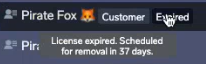
Reporting dashboard feedback survey
When accessing the new reporting dashboards, users are now invited to complete a short survey. This helps gather feedback to further improve reporting features.
(HCP-15385)
More flexible mobile and PC client visibility controls
Mobile app configuration can now be hidden from the My Profile section. The previous ViewClientAndMobileDownload permission has been split into two separate permissions:
-
ViewMobileAppDownload
-
ViewPcClientDownload
This allows more precise control over which download options are visible to users.
(HBT-5758)
Reliable download of undelivered scanned documents
Users can now successfully download scanned documents from the Web UI even if the original delivery failed. This ensures important documents remain accessible.
(HBT-5990)
Improved edge device re-registration handling
If an edge device is added, deleted, and added again, it now correctly appears in the endpoints list. This prevents confusion and ensures accurate device visibility.
(HBT-5403, HBT-5969)
Fixed loading of associated print queues
Under Settings → Locations → View associated objects, print queues now load correctly.
(HBT-5941)
Other minor UX improvements. (HCP-15179, HCP-14838, HCP-14646, HCP-14186, HBT-5898, HBT-5918)
Google Workspace support
Simplified user group synchronization
User groups from Google Workspace can now be synchronized without requiring a service account. This simplifies setup and reduces administrative complexity.
(HCP-15459)
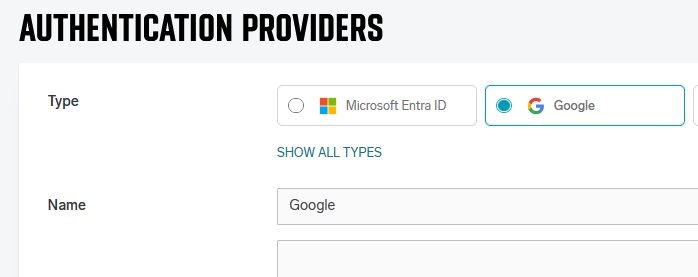
Other Improvements
Automatic cleanup of old update files
Secondary servers now correctly remove outdated update files. This helps reduce disk usage and improves system maintenance.
(HBT-5978)
Corrected expired guest account email links
The expired guest account notification email now always directs users to the correct login page, even in environments using a proxy.
(HBT-5822)
Fixed print job notification email behavior
Issues where print job processed and print job failed notification emails were not correctly enabled have been resolved.
(HBT-5964)
Security improvements
Multiple security enhancements and fixes have been implemented to strengthen platform security.
(HBT-5935)
2026.01.08
Legend:
Added feature
Improved/changed feature
Bug fixed
Admin Web UI
Environmental impact reporting and scheduling
Reports now include environmental savings metrics based on:
-
Submitted but unreleased print jobs
-
Duplex printing usage
Reports can also be scheduled and automatically delivered via email, making it easier to track sustainability efforts. (HCP-15481)
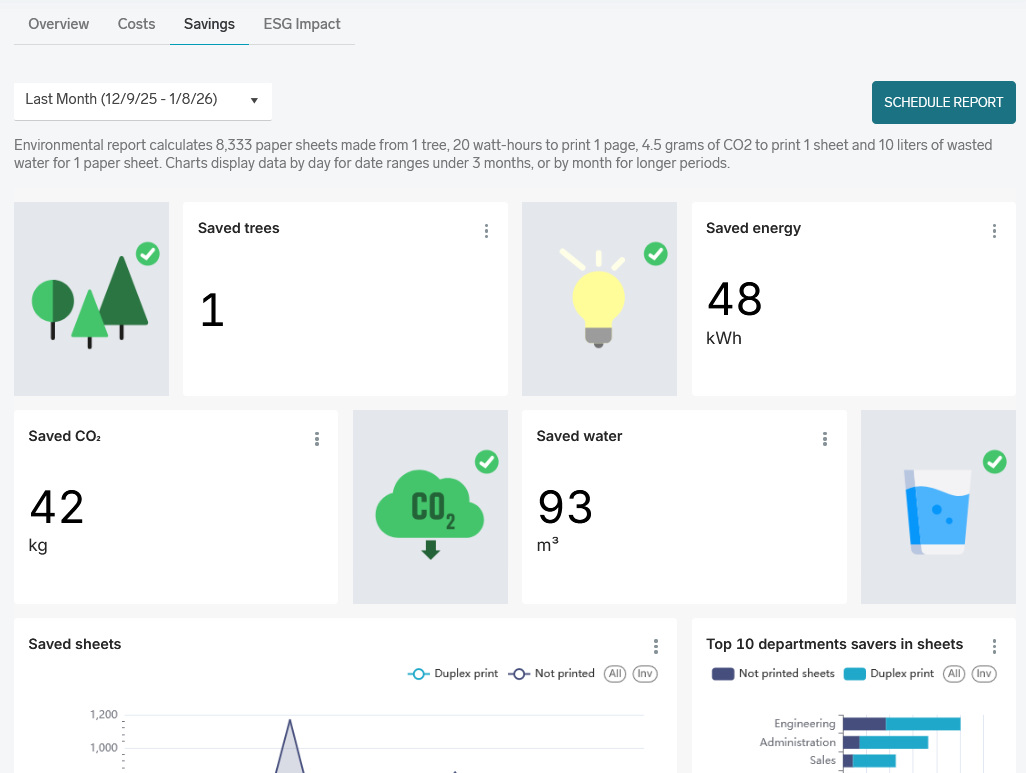
Configurable print watermark rules
Administrators can now configure a basic text watermark rule for selected types of print jobs.
When enabled, the watermark is placed in the bottom-right corner of the page and can be customized using advanced rules. Variables such as {{timestamp}} can be included to dynamically insert information into the watermark. (HCP-15494, HCP-15225)
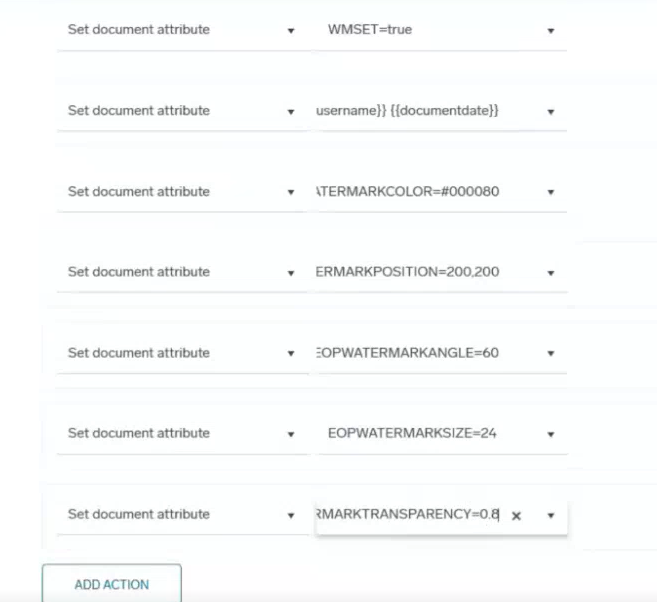
Improved printer selection experience for end users
The My Profile → Printers page has been visually redesigned to improve clarity and usability. A search and filtering option has been added, allowing users to find printers more quickly.
Search and filter when configuring print queues
When creating or editing a print queue, administrators can now search and filter available printers instead of relying solely on a dropdown list. This improves usability in environments with many printers. (HCP-15488)
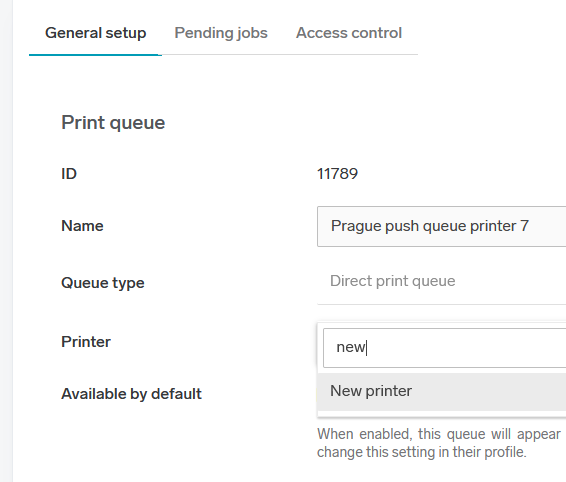
Improved audit logging for Google authentication
Google authentication errors and warnings are now properly recorded in the audit log. This improves traceability and simplifies troubleshooting. (HCP-15458)
Gen 2 Cloud Terminals
Konica Minolta application access control
Administrators can now configure Konica Minolta Gen 2 Cloud Terminals to hide the “Applications” quick action. This prevents direct access to other configured applications and improves device control. (HCP-15453)
Improved Konica Minolta print reporting on BW devices
Konica Minolta Gen 2 Cloud Terminals now correctly report print jobs on black-and-white printers when using push print. (HBT-5889)
Improved locking mode configuration (Public Beta)
When using Konica Minolta Gen 2 Cloud Terminal with locking (public beta):
-
Administrators can change connection settings even while the MFD is locked
-
Printer details correctly display the admin password during another active admin session
These changes improve manageability in secured environments. (HCP-15567, HBT-5936)
Accurate native scan accounting
Native scan accounting on Konica Minolta Gen 2 Cloud Terminal with locking (public beta) now reports correct data. (HBT-5492)
Sharp post-login redirection option
Sharp Gen 2 Cloud Terminals can now be configured to redirect users to the native home screen after login instead of opening the application quick start menu. This allows better alignment with customer workflows. (HCP-15421)
Improved card enrollment reliability on Sharp
The card enrollment process has been improved to correctly handle multiple user swipes.
Previously, if a user initiated enrollment with an unknown card and left the screen unfinished, a second user swiping their card immediately afterward could have their swipe ignored. If the second user completed the process, the first user’s card could mistakenly be enrolled. (HBT-5906)
Public API
OutputPort provides deployment stage info and extended cloud terminal status info when available. (HCP-15552)
Others
Improved compatibility and stability
Stability and compatibility improvements have been implemented for:
-
FUJIFILM BI Gen 2 Cloud Terminal
-
HP Gen 2 Cloud Terminal (2025.12.29 release)
-
OmniBridge
(HCP-14973, HBT-5955, HBT-5923)
Improved OpenLDAP compatibility
OpenLDAP authentication now succeeds even when the baseDN is set higher than the user's actual directory location. (HBT-5921)
Corrected email templates
-
Expired guest account notifications now include the correct login link, even when using a proxy.
-
“Scan is ready to download” emails now correctly include the download link.
(HBT-5822, HBT-5747)
Additional UI and security improvements
Various minor UI refinements and security fixes have been implemented to further improve platform stability and protection.
(HBT-5886, HBT-5739, HBT-5722, HBT-5666, HCP-15456, HBT-5779, HBT-5877, HBT-5811, HBT-5954, HBT-5818)